
Light and biomes
Overview
Section titled “Overview”This page covers two modes.
- Light/spawn check: shows the light level (0 ~ 15) of each cell as a color and counts the cells where monsters can spawn. It also suggests light source spots that light up all spawn cells and places them in one go.
- Biome paint: paints a biome map onto the world in 16×16-cell units. Grass, leaf and water colors are shown according to the painted biomes, and Foliage chooses trees and grass that match each biome.
Both modes are in the More modes list at the right end of the toolbar.
Basic use
Section titled “Basic use”Finding and lighting dark spots
Section titled “Finding and lighting dark spots”-
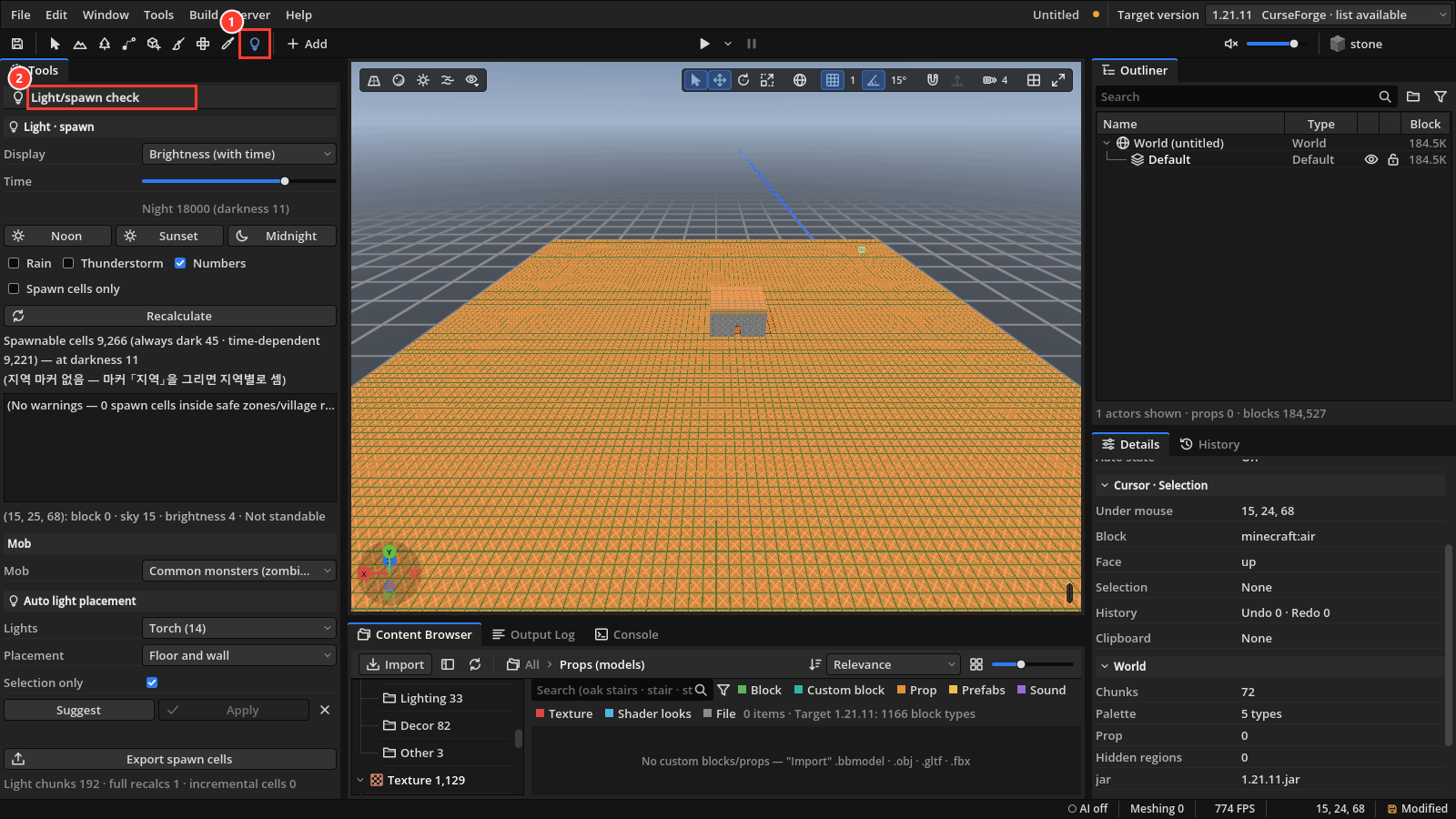
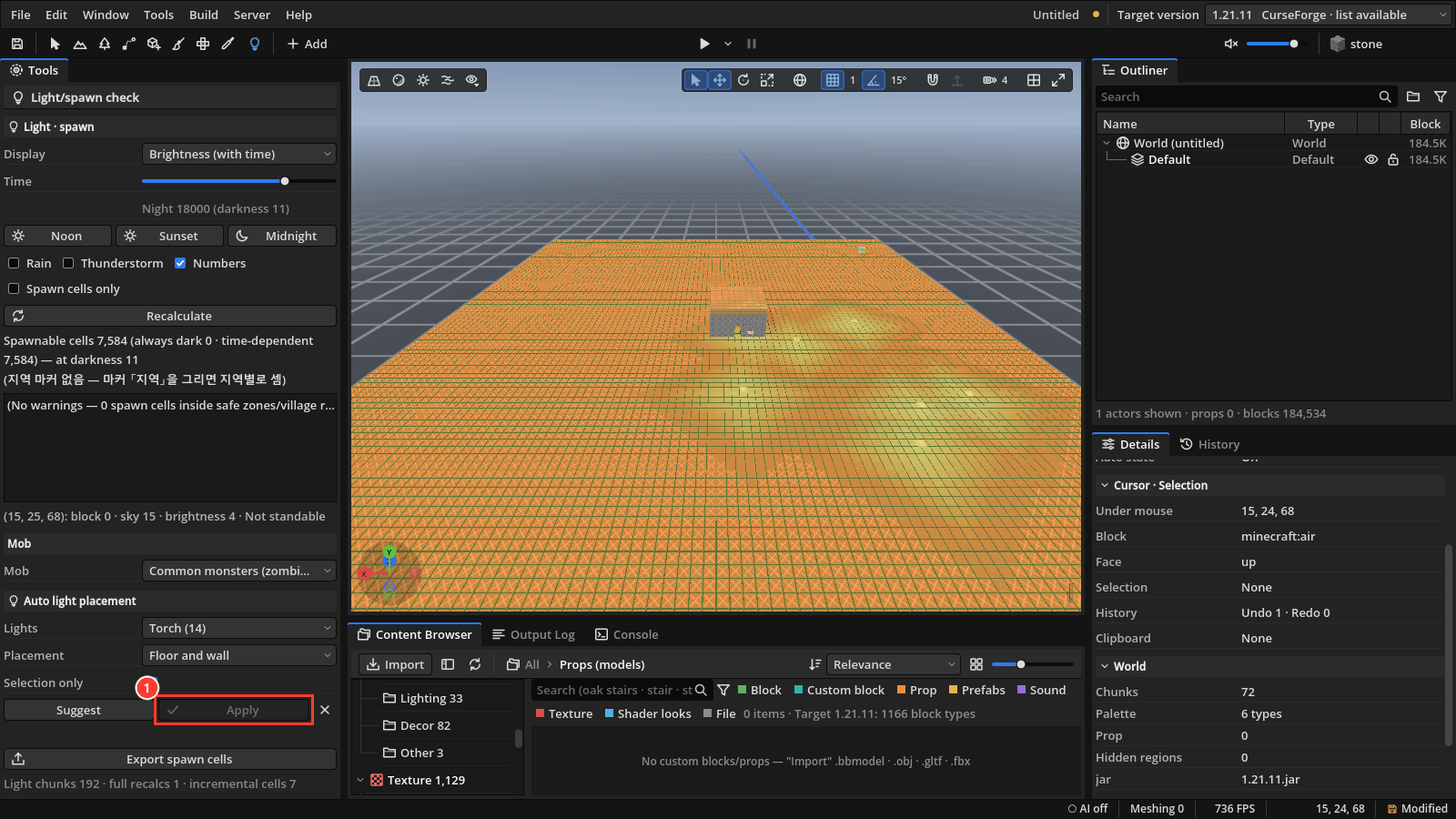
Press Shift+L to enter the Light/spawn check mode. The More modes button on the toolbar changes to a light bulb icon, and the viewport cells are colored by light level (0 red → 7 orange → 15 yellow).
-
Click Noon. The count is redone for game time 6000 (noon). At midday, only cells that get less light, such as under roofs, remain spawn cells (demo: 19 cells inside the cabin).
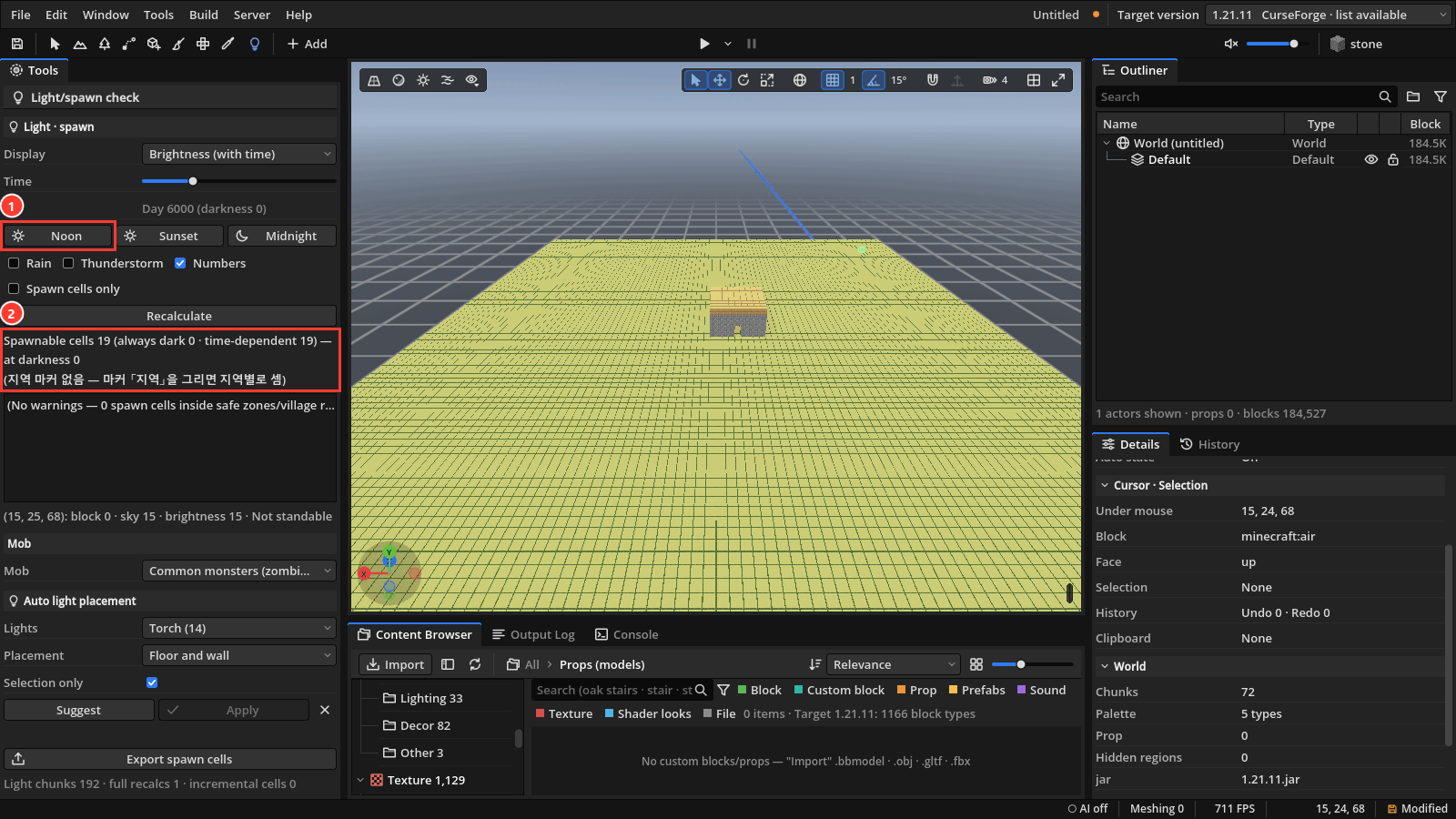
Known issue in 0.10.2: the summary line that starts with “(지역 마커 없음” is shown in untranslated Korean. It means that there are no region markers and that drawing “Regions” markers gives a count per region.
-
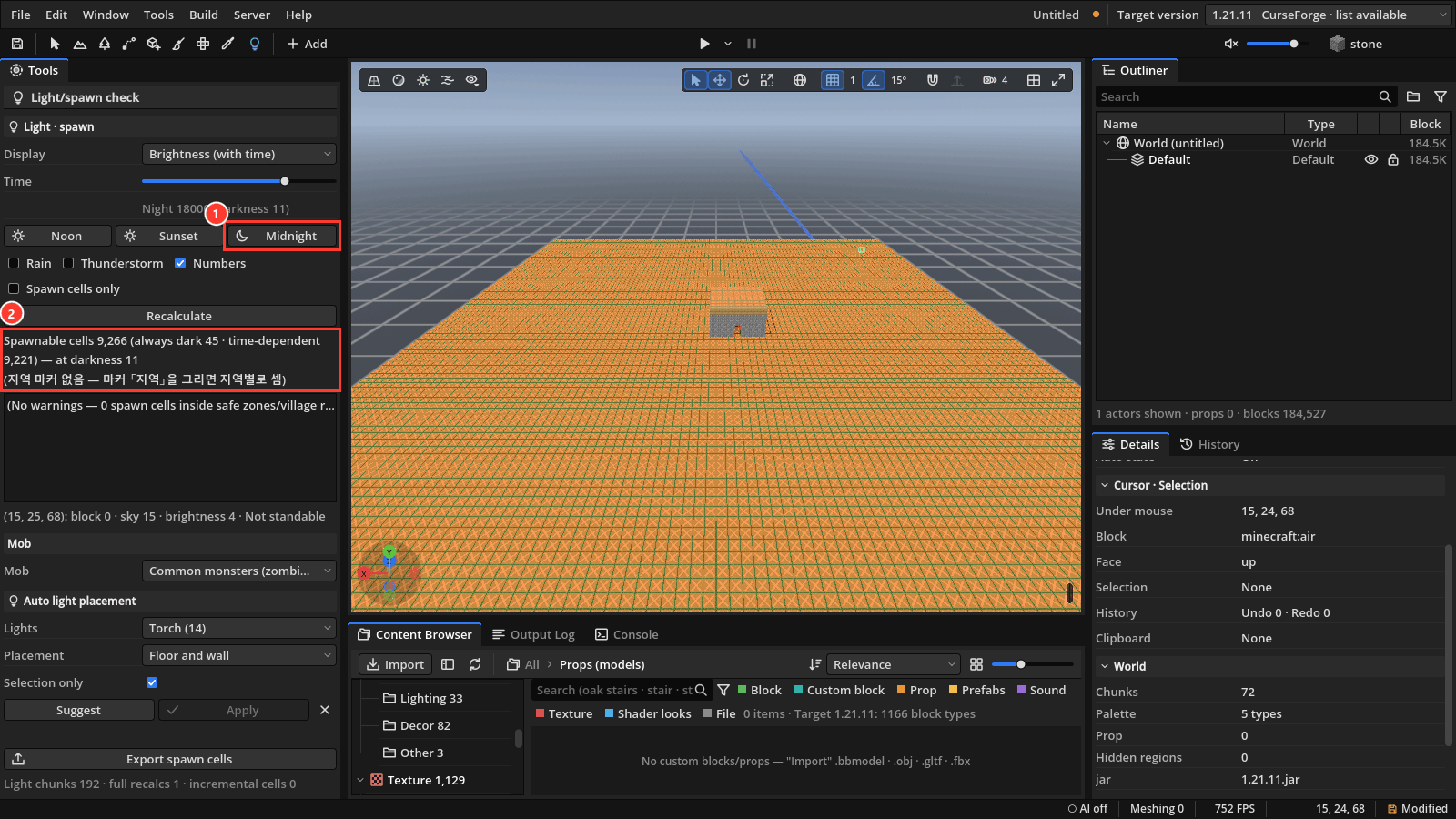
Click Midnight. It uses the darkest time (18000), so the meadow outside also becomes spawn cells (demo: “Spawnable cells 9,266 (always dark 45 · time-dependent 9,221)”).
-
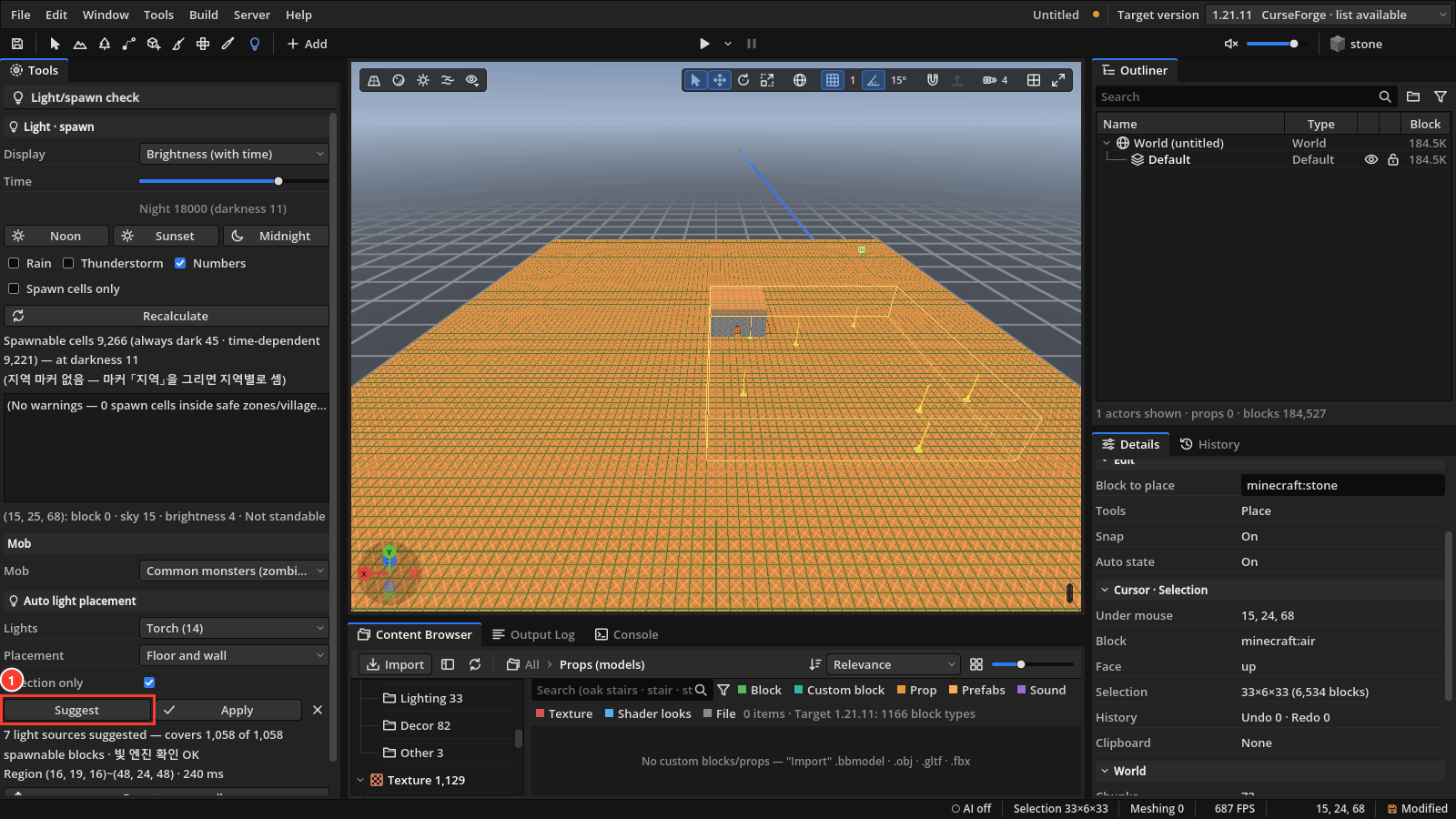
Select the region to light and click Suggest under Auto light placement. For the current time and mob, it shows the fewest light source spots that light up all spawn cells as yellow ghosts. The world does not change yet (demo: 7 light sources cover all 1,058 spawn cells).
-
Click Apply. Light sources are placed at the suggested spots, and the spawn cells in the selection drop to 0. This is one undo step.
Painting biomes
Section titled “Painting biomes”-
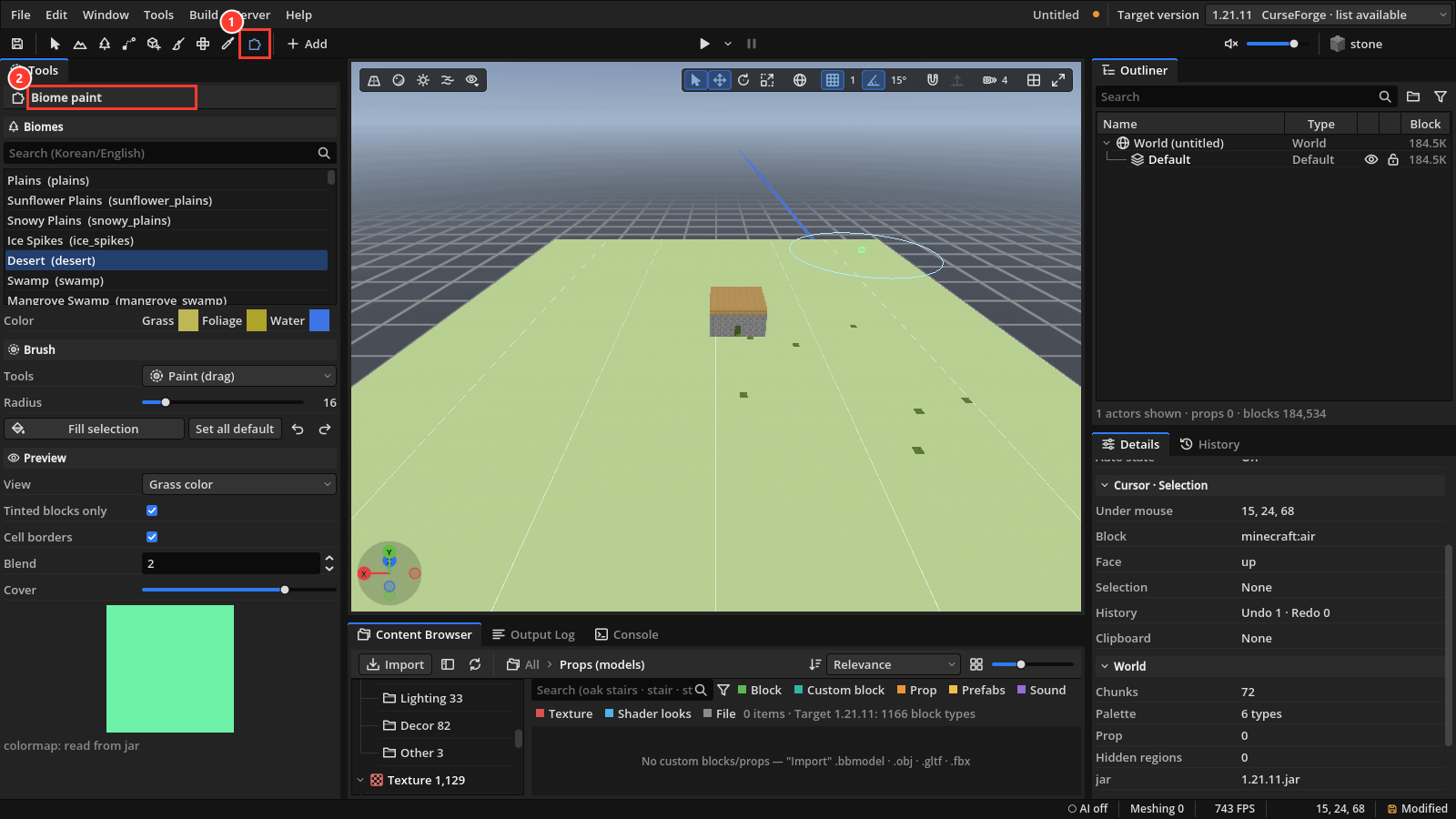
Click More modes at the right end of the toolbar and select Biome paint.
-
Type
desertin the search field and select “Desert (desert)” in the list. Search works with both Korean names and English ids.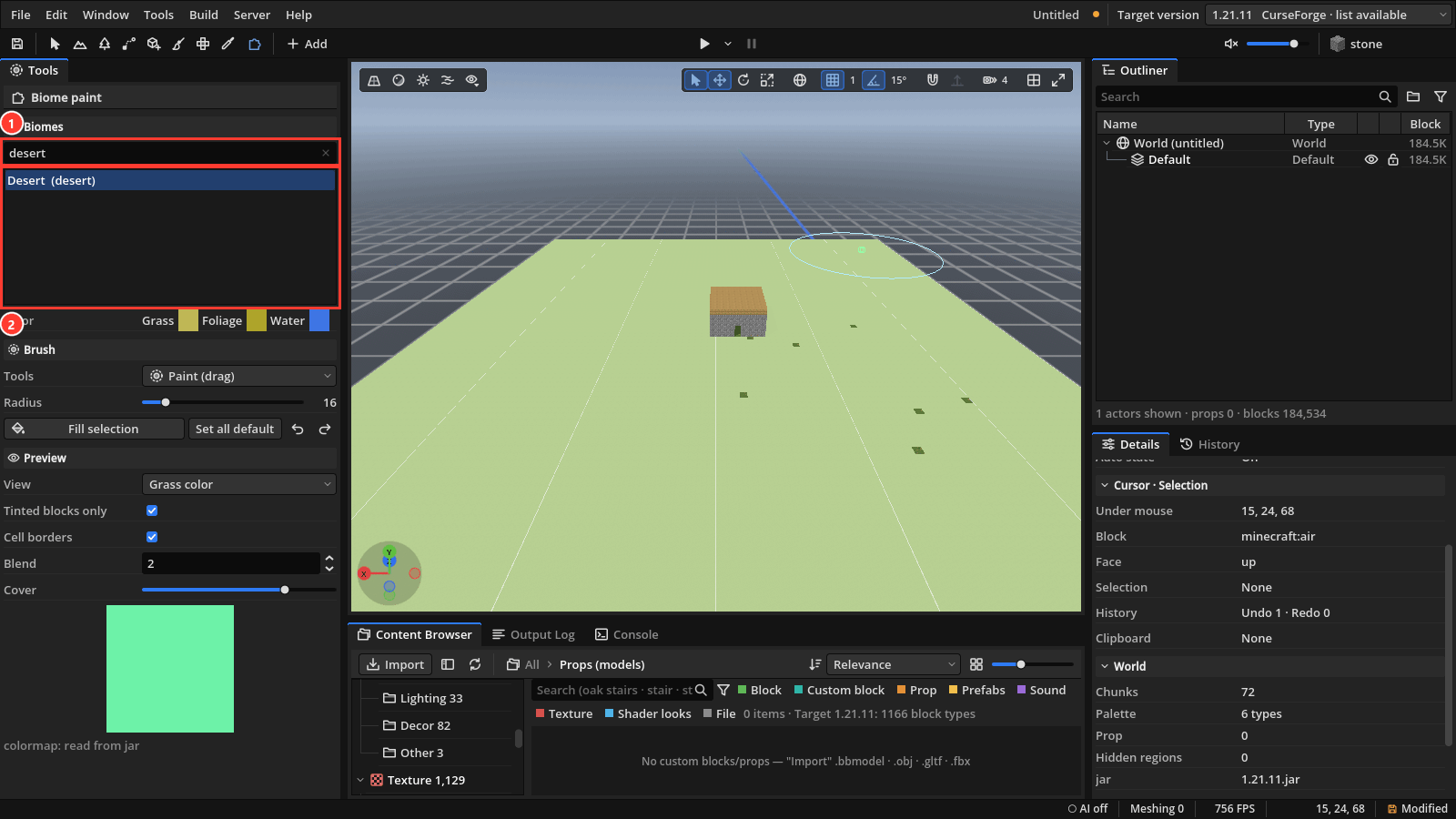
Known issue in 0.10.2: the search matches only the Korean biome name or the English id in parentheses (such as
desert), not the translated name shown first in the list. -
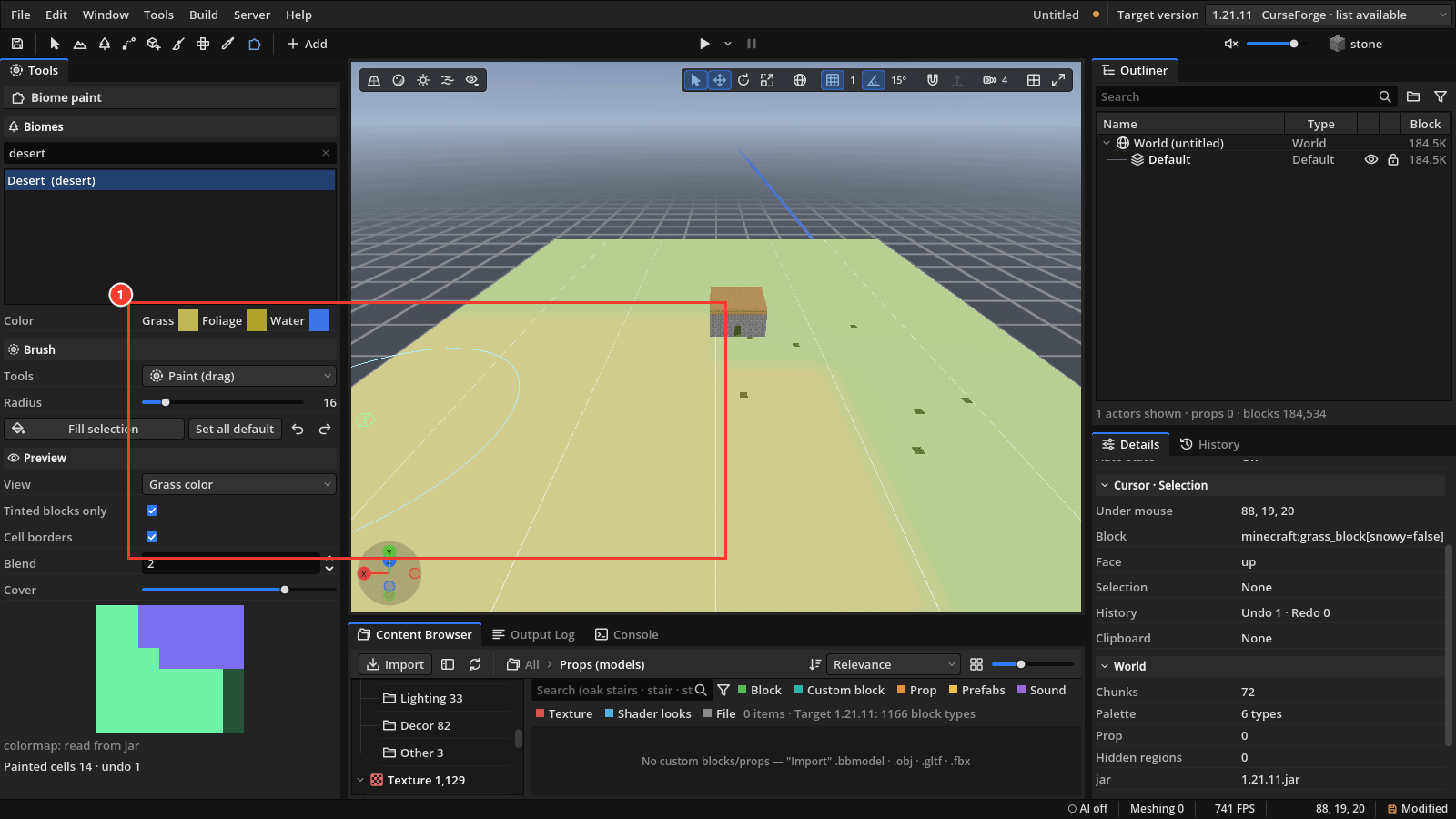
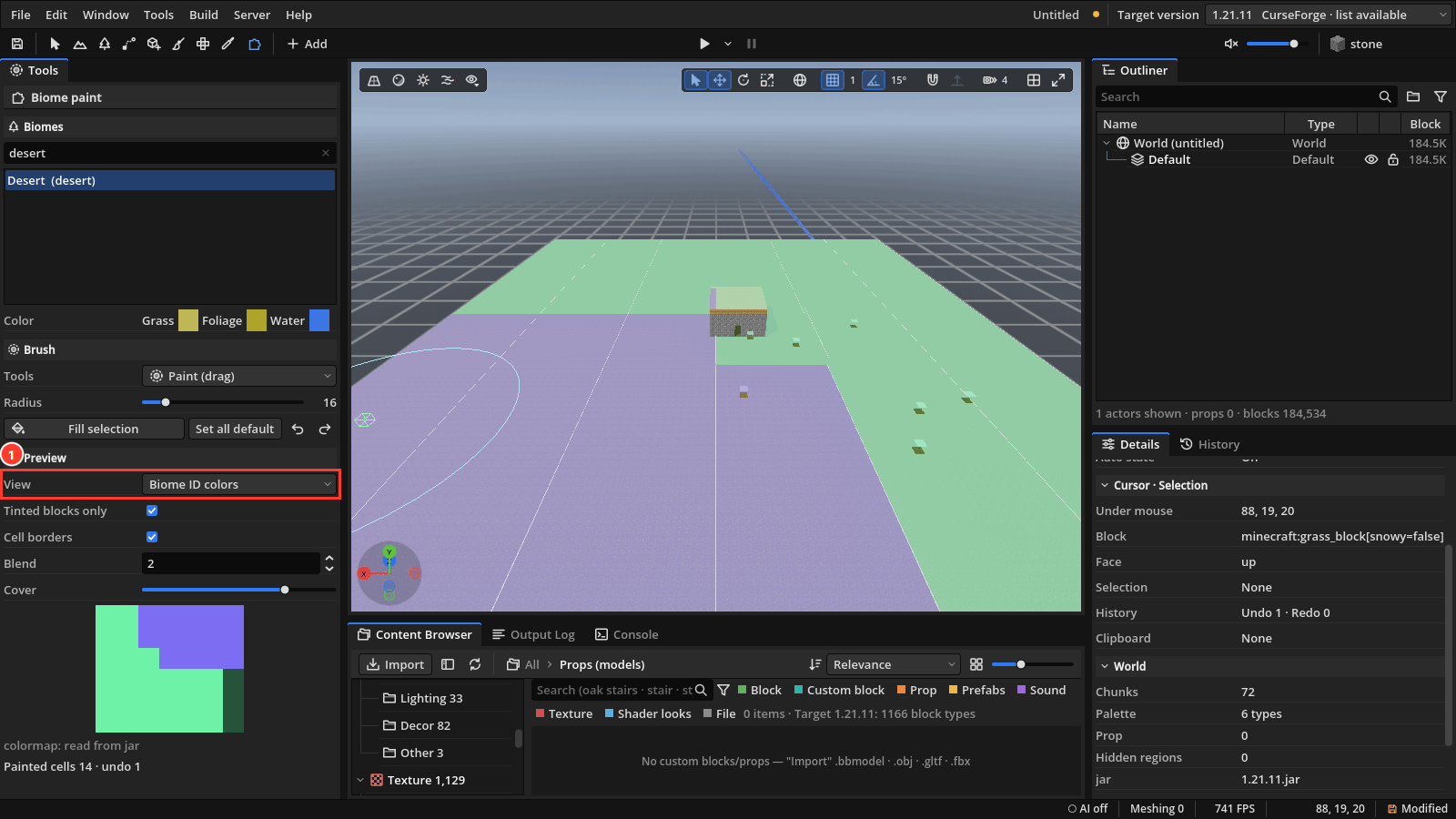
Drag across the ground in the viewport. Every 16×16 cell touched by the brush Radius becomes desert, and the grass color of the painted cells changes to the desert grass color.
-
Under View in Preview, select “Biome ID colors”. The cells are shown in a different color for each biome.
Tips and tricks
Section titled “Tips and tricks”- Do spawn-proofing at Midnight. Even if noon shows 0 cells, everything outside becomes spawn cells at night.
- Applying light sources is a block edit, so in any mode other than Biome paint, one Ctrl+Z undoes all of them (demo: 7 torches → 0).
- In the Biome paint mode, Ctrl+Z · Ctrl+Y undo and redo only biome painting. Blocks (light sources, etc.) stay as they are. The undo · redo icon buttons in the panel do the same.
- While painting biomes, Ctrl+click the ground to pick that cell’s biome (eyedropper).
- After painting biomes, turn on Follow biomes in Foliage and scatter: each biome gets different trees and grass.
Reference
Section titled “Reference”Light · spawn check fields
Section titled “Light · spawn check fields”| Field | Range | Default | Description |
|---|---|---|---|
| Display | “Off” · “Brightness (with time)” · “Block light” · “Sky light” | “Brightness (with time)” | Value shown as the cell color. Brightness = the larger of block light and (sky light − time darkness), the same as the game’s F3 screen. |
| Time | 0 ~ 23999 ticks | 18000 | Game time. The Noon (6000) · Sunset · Midnight (18000) buttons set it right away. |
| Rain · Thunderstorm | On/off | Off | Adds sky darkening from weather. |
| Numbers | On/off | On | Writes light numbers on cells near the camera. |
| Spawn cells only | On/off | Off | Hides the light colors and shows only spawn cells (red X). |
| Mob | “Common monsters (zombie·skeleton·creeper)” · “Spider (3×3 space)” · “Enderman (3 blocks tall)” · “Slime (slime chunk·y<40)” | Common monsters | Recounts spawn cells for the body size. Slimes are counted by slime chunk regardless of light. |
| Lights | “Torch (14)” · “Soul torch (10)” · “Lantern (15)” · “Soul lantern (10)” · “Glowstone (15)” · “Sea lantern (15)” · “Light block 15 (invisible)” | “Torch (14)” | Light source to place. |
| Placement | “Floor and wall” · “Floor only” · “Walls only” | “Floor and wall” | Only torch types attach to walls (they become wall torches). |
| Selection only | On/off | On | Looks only inside the selection. Without a selection, the whole world. |
- Recalculate recounts with the current world and updates the summary. Click a row in the warning list to go to that cell.
- If you draw “Regions” markers, spawn cells are counted per region, and spawn cells inside safe-zone and village regions are shown as warnings (Markers, load budget and snapshots).
- Spawn cell conditions (rules since 1.18): block light 0 · brightness ≤ 7 · a solid top surface below · empty space above.
- One suggestion can cover a region of up to 4 million cells.
- Export spawn cells (or Build > Export spawn cell list (json)) writes the spawn cell list as JSON. It does not overwrite a file with the same name.
- The menu items Tools > Light/spawn report · Tools > Suggest auto light placement run the same report and suggestion.
Biome paint fields
Section titled “Biome paint fields”| Field | Range | Default | Description |
|---|---|---|---|
| Tools | “Paint (drag)” · “Eyedropper” · “Fill selection” | “Paint (drag)” | Shift+drag erases (to the default biome). |
| Radius | 0 ~ 128 | 16 | Brush radius (blocks). Every 16×16 cell touched by the radius changes. Change it with [ · ]. |
| Fill selection · Set all default | — | — | Fills the selection’s cells with the current biome · sets the biome of unpainted cells to the current biome. |
| View | “Off” · “Biome ID colors” · “Grass color” · “Foliage color” · “Water color” | “Grass color” | Type of preview overlay. |
| Tinted blocks only | On/off | On | Paints grass color only on grass blocks and grass tops, foliage color only on leaves, water color only on water, so it looks like the real thing. |
| Cell borders | On/off | On | Draws the borders of the 16×16 biome cells. |
| Blend | 0 ~ 7 | 2 | Radius of the game option “Biome blend” (2 = 5×5). |
| Cover | 0.2 ~ 1 | 0.8 | Opacity of the preview overlay. |
- Grass, leaf and water colors are read from the colormap of the target version jar (“colormap: read from jar” at the bottom of the panel). The small map at the bottom of the panel shows the biome cells seen from above.
- The biome map is saved together in the world file (
.npworld). - Tools > Toggle biome tint (grass·leaves·water) renderer (on by default) draws grass, leaf and water blocks in the viewport with the painted biome colors.
Console commands
Section titled “Console commands”| Command | Action |
|---|---|
light [time] | Prints the light · spawn report and goes to the first warning cell. time defaults to 18000. |
lightplan [torch|soul|lantern|glowstone|sea] [both|floor|wall] [apply] | Suggests light source spots. Add apply to place them right away. |
spawnmob <generic|spider|enderman|slime> [seed] | Changes the mob used to count spawn cells. |
spawnexport [file.json] | Writes the spawn cell list as JSON. |
biome <biome|list> [radius] | Chooses the biome to paint (e.g. biome desert 32). |
biomefill [biome] | Fills the selection’s cells with that biome. |
biomeundo | Undoes one step of biome painting. |
Good to know
Section titled “Good to know”- The light · spawn check treats custom blocks (
np:) as opaque with light 0. Areas around custom blocks that emit light may come out darker than they really are. - During a server connection (live), biome painting stays only in the editor map and does not change the biomes of the server world. Applying light sources is a block edit, so it goes to the server right away.
- Light sources are not placed inside protected areas.
Related pages
Section titled “Related pages”Not an official Minecraft product. Not approved by or associated with Mojang or Microsoft.