
Testing and debugging
Overview
Section titled “Overview”You test an external plugin in three ways. Enable it in the editor and check it with the Output Log and the Plugin Manager, unit test logic such as block calculations with a fake INpWorld, and finally try it by hand following the manual checklist. You cannot attach a debugger to the 0.10.2 installed build, so logs and unit tests are the main tools.
| What you want to do | How |
|---|---|
| View logs | Output Log panel — [your id] … (host.Log); the exception type and message if isolated |
| View state | Plugin Manager · plugins in the Console |
| Reload a fixed dll | Reload (selected) in the Plugin Manager |
| Test logic quickly | Unit tests with a fake INpWorld |
| Check after the editor closes | Log files in %APPDATA%\NPEditor\logs\ |
Basic use
Section titled “Basic use”-
In the Window menu, check Output Log to open the panel.
-
Rebuild the plugin. The editor does not lock the dll, so you can build while it is running.
-
Overwrite the dll (and the
.pdb) in the same plugin folder with the new one. -
In the Plugin Manager, select that row and click Reload (selected).
-
Check that the Output Log shows a
[Plugin <id>] <version> enabled — <registration summary>line.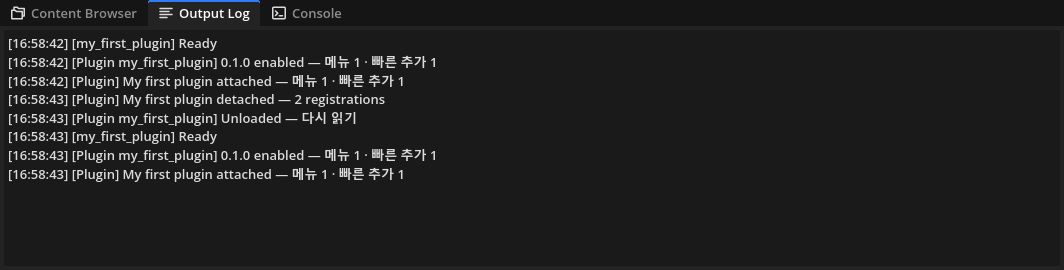
Known issue in 0.10.2: the registration summary and the unload reason are shown in Korean.
메뉴 1 · 빠른 추가 1means “Menu 1 · Quick add 1”, andUnloaded — 다시 읽기means “Unloaded — reload”. -
Try the feature. If the plugin is isolated, read the
Error → isolated — <where>: …line in the Output Log, fix the problem, and start again from step 2.
Tips and tricks
Section titled “Tips and tricks”Copy after build
Section titled “Copy after build”If each build copies its output into the plugin folder automatically, you no longer need step 3. Add the following step to your csproj.
<!-- inside MyFirstPlugin.csproj --><Target Name="CopyToNpPlugins" AfterTargets="Build"> <ItemGroup> <_NpOut Include="$(OutDir)$(TargetName).dll;$(OutDir)plugin.json" /> <_NpOut Include="$(OutDir)$(TargetName).pdb" Condition="Exists('$(OutDir)$(TargetName).pdb')" /> </ItemGroup> <Copy SourceFiles="@(_NpOut)" DestinationFolder="$(APPDATA)\NPEditor\plugins\my_first_plugin\" SkipUnchangedFiles="true" /></Target>- Always copy to the same folder. Approval is remembered by
idand folder, so overwriting in the same folder does not need a new approval. - Do not make the dll or a subfolder inside the plugin folder a link (symbolic link · junction). A link that points outside the plugin folder is “Error (file)”.
Keeping exception stacks
Section titled “Keeping exception stacks”When a plugin is isolated, the Output Log keeps only <where>: <exception type>: <message>, not the stack. Where you need the stack, catch the exception yourself inside the callback and write it with host.Log. If you put the .pdb in the same folder, the stack shows line numbers for your code.
host.AddCommand(new NpCommand("road_build", "road_build", "Road in the selection", args =>{    try { return BuildRoad(host.World); }    catch (Exception e) { host.Log(e.ToString()); throw; }   // logs the stack · line numbers; isolation still happens}));
static string BuildRoad(INpWorld w) => w.Selection is { } b ? $"{b.SizeX}×{b.SizeZ}" : "No selection";
Log files
Section titled “Log files”If the editor closes suddenly and you cannot see the Output Log, open %APPDATA%\NPEditor\logs\.
| File | Contents |
|---|---|
godot.log | Editor console log. It records host.Message notifications and isolation notifications (“Plugin 'godot<date time>.log. |
np_editor_errors.log | Unhandled editor exceptions while handling menus · buttons (with stack) |
Text from host.Log stays only in the Output Log panel, not in these files. For records that must survive a shutdown, use host.Message or write your own file under PluginDir.
Reference
Section titled “Reference”Output Log lines
Section titled “Output Log lines”| Line | Meaning |
|---|---|
[<id>] … | Text written with host.Log |
[Plugin <id>] <version> enabled — 메뉴 1 · 빠른 추가 1 | Load succeeded, with the registration summary (Korean in 0.10.2: “Menu 1 · Quick add 1”) |
[Plugin] <name> attached — … | Attached to the editor screen |
[Plugin <id>] Load failed: <exception type>: <message> | Exception in the entry class · Register |
[Plugin <id>] Error → isolated — <where>: <exception type>: <message> | Exception in a callback. <where> appears as Menu <name> · Command <name> · Committed and so on. |
[Plugin <id>] Unloaded — <reason> | Unloaded by disabling · reloading · an error (the reason is Korean in 0.10.2, for example 다시 읽기 = reload) |
[Plugin] <name> detached — <count> registrations | Detached from the editor screen |
[Plugin <id>] New plugin, not loaded automatically — … | A new folder you have not allowed yet |
[Plugin <id>] Not loaded: overlaps a built-in feature — … | A world logic type collides with a built-in type or another plugin |
When a plugin is isolated, the notification “Plugin '
Console commands
Section titled “Console commands”| Command | What it does |
|---|---|
plugins | Plugin list: id · version · state · error |
plugins reload | Rescans the folders and loads enabled plugins (plugins already on are not reloaded) |
Unit tests (fake INpWorld)
Section titled “Unit tests (fake INpWorld)”The SDK is interfaces only, so you can test plugin logic without the editor by using a small class that imitates INpWorld. Move the code that creates blocks into functions that take an INpWorld. The test project also references NP.Editor.Sdk.dll in the install folder, but unlike the plugin csproj it does not use Private=false (the SDK dll must be in the test run folder).
using NP.Editor.Sdk;
/// <summary>Fake world for tests: cell → block state.</summary>public sealed class FakeWorld : INpWorld{    private readonly Dictionary<NpCell, string> _b = new();    public string? FilePath => null;    public NpBox? Selection { get; set; }    public NpBox? Bounds => null;    public string GetBlock(int x, int y, int z) => _b.TryGetValue(new NpCell(x, y, z), out var s) ? s : "minecraft:air";    public bool IsAir(int x, int y, int z) => !_b.ContainsKey(new NpCell(x, y, z));    public IEnumerable<NpBlock> Blocks(NpBox? box = null) =>        _b.Where(kv => box is not { } bb || bb.Contains(kv.Key.X, kv.Key.Y, kv.Key.Z))          .Select(kv => new NpBlock(kv.Key.X, kv.Key.Y, kv.Key.Z, kv.Value));    public long CountBlocks() => _b.Count;    public int Edit(string label, Action<INpEdit> build) { var e = new Ed(_b); build(e); return e.Changed; }
    private sealed class Ed : INpEdit    {        private readonly Dictionary<NpCell, string> _b; public int Changed;        public Ed(Dictionary<NpCell, string> b) => _b = b;        public void Set(int x, int y, int z, string state)        {            var c = new NpCell(x, y, z);            if (state is "" or "air" or "minecraft:air") { if (_b.Remove(c)) Changed++; return; }            if (!_b.TryGetValue(c, out var old) || old != state) { _b[c] = state; Changed++; }        }        public void Clear(int x, int y, int z) => Set(x, y, z, "minecraft:air");    }}
// Code under test (inside the plugin)public static class PillarBuilder{    public static int Build(INpWorld w, NpCell at) => w.Edit("3×3 pillar", e =>    {        for (int y = 0; y < 6; y++)            for (int x = 0; x < 3; x++)                for (int z = 0; z < 3; z++)                    e.Set(at.X + x, at.Y + y, at.Z + z, "minecraft:stone_bricks");    });}
An xUnit test example.
using NP.Editor.Sdk;using Xunit;
public class PillarTests{    [Fact]    public void Pillar_is_3x3x6()    {        var w = new FakeWorld();        int n = PillarBuilder.Build(w, new NpCell(0, 1, 0));        Assert.Equal(54, n);        Assert.Equal("minecraft:stone_bricks", w.GetBlock(2, 6, 2));        Assert.True(w.IsAir(0, 7, 0));    }
[Fact] public void Simulate_can_be_called_directly() { Func<NpSceneSim, bool> simulate = s => s.Num("r", 5) > 3; // the same function as the plugin's Simulate var log = new List<string>(); var sim = new NpSceneSim(NpSceneEventRole.Condition, "myquest_far", "r1", "Steve", 0, new Dictionary<string, string> { ["r"] = "8" }, new[] { "Steve" }, log.Add, null, _ => null); Assert.True(simulate(sim)); }}| Easy to test | How |
|---|---|
| Block placement calculations | Edit on a fake INpWorld, then check GetBlock |
| Command result text | Move the command function out, call it with an argument array and check the returned text |
| Exports such as CSV | Call the export function with a temporary path and check the file |
| World logic preview | Create new NpSceneSim(...) directly and call the Simulate function |
A fake world cannot check the editor’s locking and undo behavior. At the end, check by hand in the editor.
Debugger
Section titled “Debugger”The 0.10.2 installed build turns off .NET diagnostics at startup (to protect sign-in and the license). So you cannot attach a debugger to the installed NPEditor.exe with your IDE’s “Attach to Process”. Debug with the logs · exception stacks · unit tests above.
In the installed build, the editor’s internal non-public names are changed (obfuscated), and there is no editor .pdb. In exception stacks, editor frames show the changed names, but frames from your plugin dll are unchanged.
Screen verification scenarios (AddShotScenario)
Section titled “Screen verification scenarios (AddShotScenario)”AddShotScenario registers a scenario for the editor’s screen verification runner (--np-shot=<id>). A scenario changes the world, places the camera, and records verdicts and screenshots.
host.AddShotScenario(new NpShot("myroad_smoke", async api =>{ api.World.Edit("Test", e => e.Set(0, 1, 0, "minecraft:stone")); api.LookAt(6, 6, -6, 0, 1, 0); // eye (6,6,-6) → looks at (0,1,0) await api.Frames(5); // wait 5 frames api.Check(api.World.GetBlock(0, 1, 0) == "minecraft:stone", "Stone placed"); await api.Shot("smoke"); // save PNG}));Limitation: the runner exists only in development builds of the editor, not in the installed build. Even development builds do not read the user plugin folder when they run for automated checks. So in 0.10.2 there is no way to run an external plugin’s scenarios. For external plugins, use unit tests and manual checks.
Manual checklist
Section titled “Manual checklist”| Check | Why |
|---|---|
| Enable → disable → enable | Menus and panels are not created twice or left behind |
| New world · open another world | State is cleared in WorldChanged |
| Use a feature once → Ctrl+Z once | It cleanly reverts in a single undo step |
| No selection · empty world | No exceptions when Selection · Bounds are null |
| Large world | Committed and live text do not stall the editor |
| Inside a protected area | The message is still correct when the Edit return value is lower |
Related pages
Section titled “Related pages”Not an official Minecraft product. Not approved by or associated with Mojang or Microsoft.