
Testing in Play mode
Overview
Section titled “Overview”Play tests World logic rules inside the editor without a server. Rules, walking physics and animations run at the same 20 TPS (20 ticks per second) as the server. Blocks and state changed during Play all return to their original state when you stop.
| Mode | Camera | Player |
|---|---|---|
| Play | First person — the player’s eyes | You walk yourself. The body’s name is player. |
| Simulate | The edit camera as is (free) | A blue capsule is the player. |
Basic use
Section titled “Basic use”The screenshots were taken on the road in front of the castle gate in the sample world castle.npworld, with one rule: the manually fired trigger When chatting → Chat message (text You said: {message}).
-
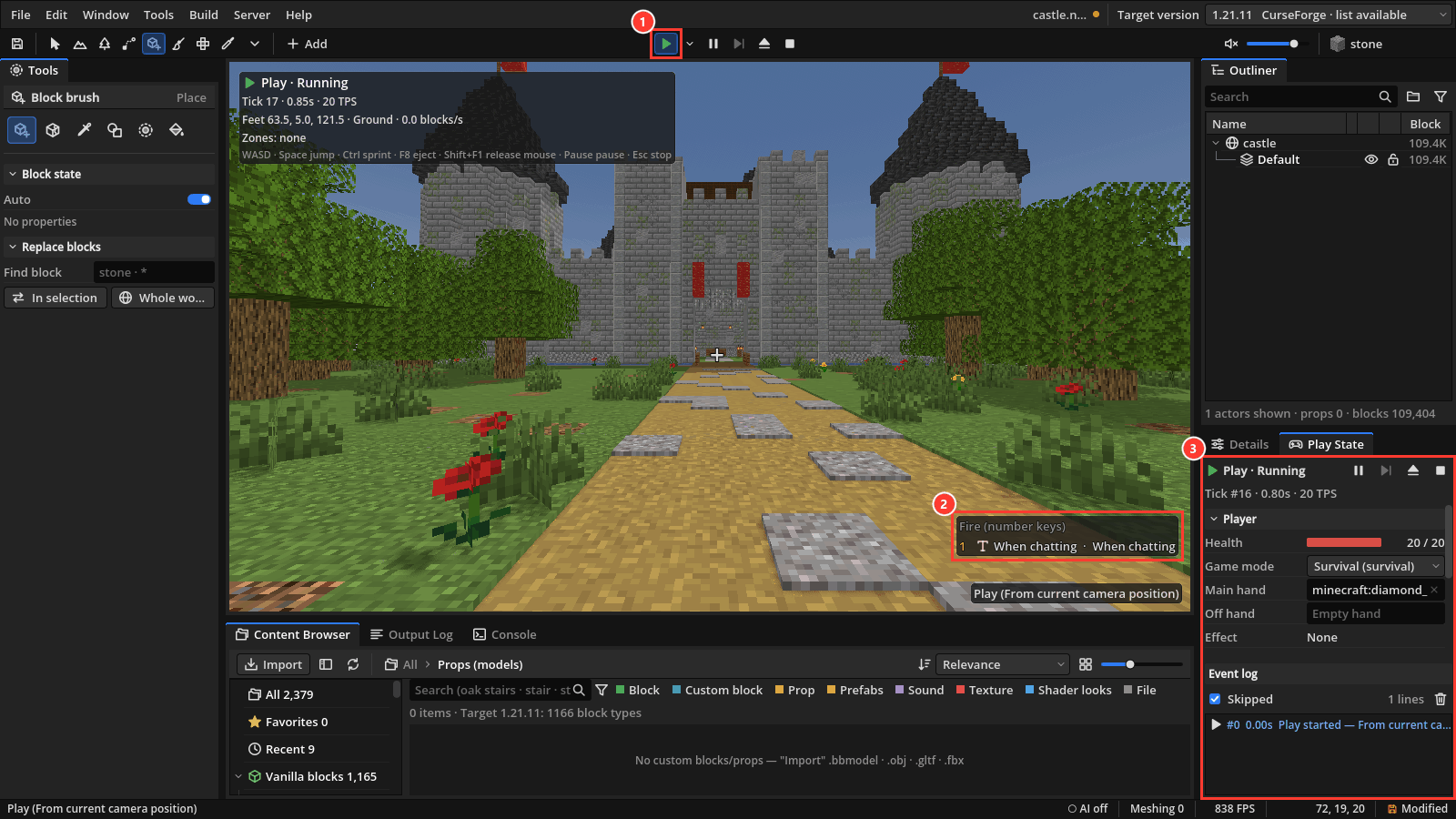
Click ▾ next to ▶ in the middle of the toolbar. Select the mode (Play — walk in the viewport (Alt+P) · Simulate — free camera, logic only (Alt+S)), the start location (From current camera position · From spawn point (Project Settings default spawn)) and Play stats overlay (tick · zone · flag). ▶ uses the mode you picked.

-
Click the ▶ button. A body appears at the camera position and the view switches to first person. Play info (tick · foot position · zone) appears at the top left of the viewport, the “Fire (number keys)” list at the bottom right, and the Play State panel opens in the bottom right area.
-
Press 1 to fire the first rule in the “Fire” list (When chatting). Firing runs the rule with an example value (chat text “안녕”), so “You said: 안녕” appears in the chat.
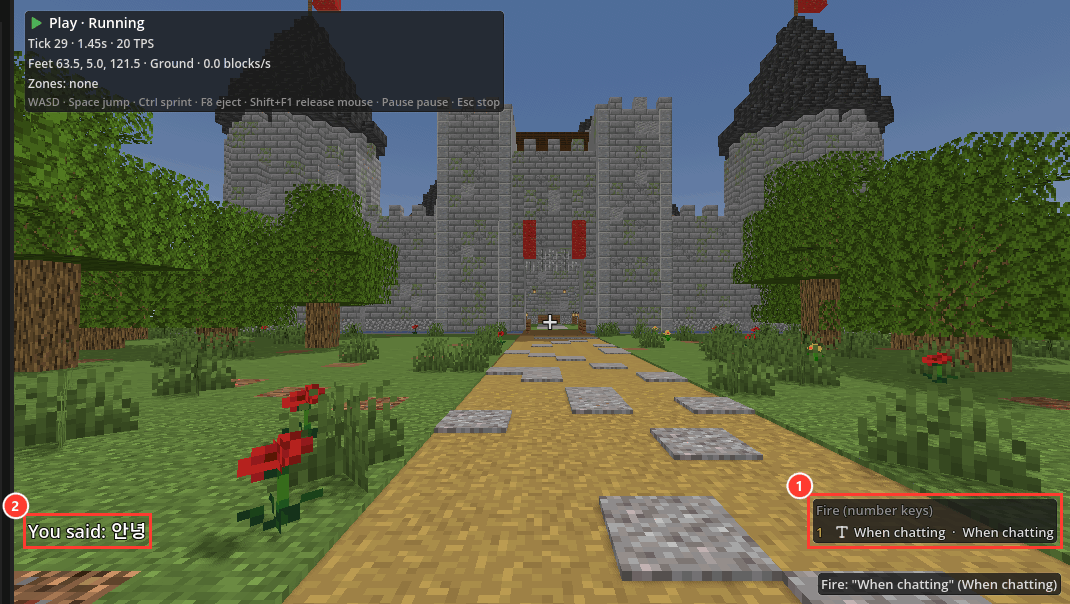
Known issue in 0.10.2: the example chat text “안녕” (“hello”) is not translated.
-
Press Pause to pause. Ticks stop and the one-tick button turns on. Each click of the one-tick button advances 1/20 second. Press Pause again to resume.

-
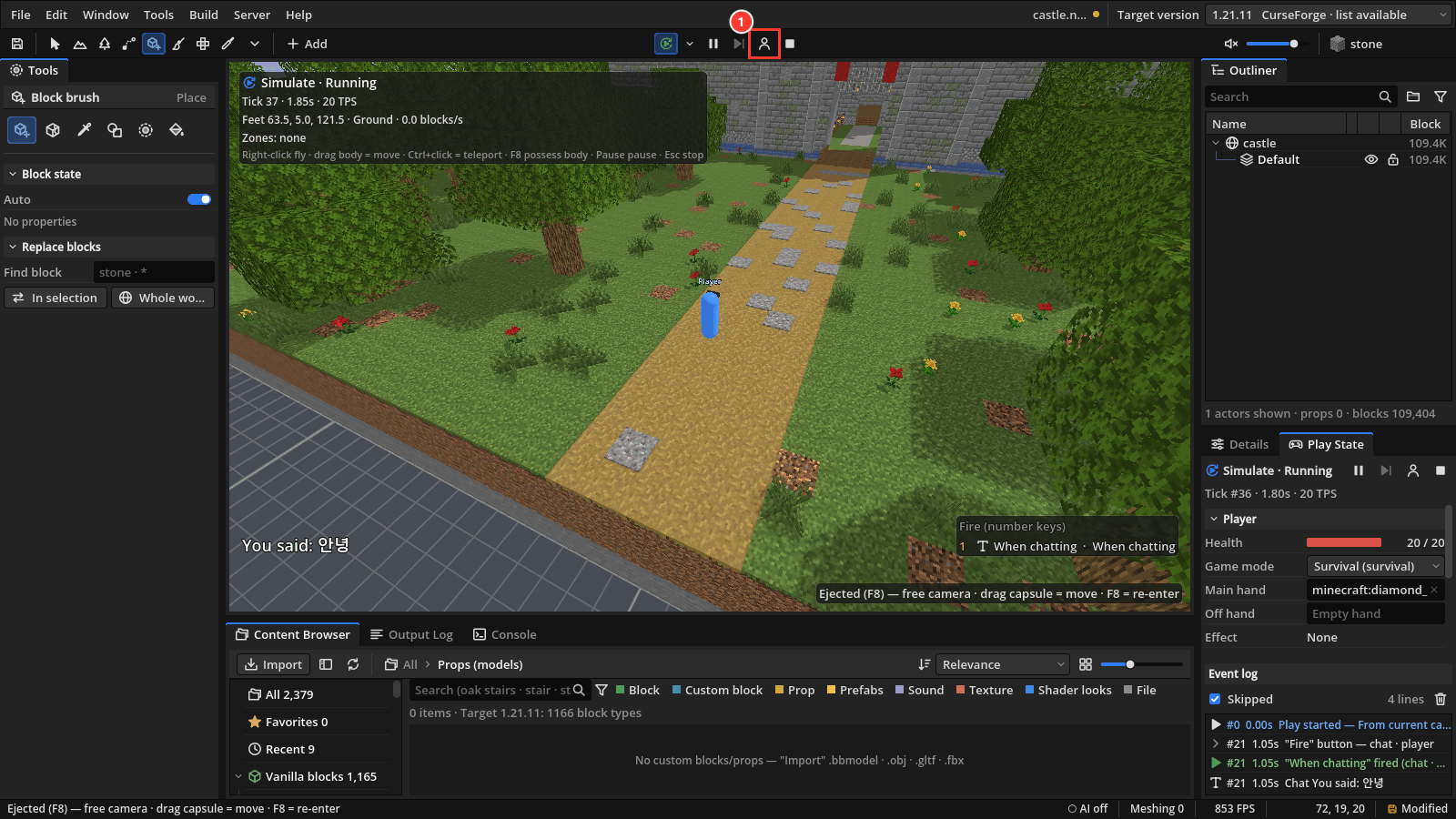
Press F8 to leave the body (eject). Play switches to Simulate, you can move the camera freely, and the body appears as a blue capsule. Press F8 again to re-enter the body.
-
Press Esc to stop Play. The world and the undo history are as they were before you started.
Tips and tricks
Section titled “Tips and tricks”- Editing shortcuts are blocked during Play. Ctrl+Z and tool keys (Q etc.) do not undo or change tools (the keys belong to walking).
- Click Tools > Simulate (free camera · logic) to start Simulate directly regardless of the ▶ mode; click it again during Play to stop.
- Use “Fire” to test triggers that do not happen on their own (chat · damage · breaking blocks …). “Fire” at the end of a rule row in the World logic tab and rule firing in the Play State panel do the same.
- “When a player joins” rules run the moment the body appears — Tutorial: your first script.
0.10.2: The Alt+P and Alt+S keys shown in the ▾ menu do not work. Use the ▶ button or the Tools menu.
Reference
Section titled “Reference”Toolbar buttons (during Play)
Section titled “Toolbar buttons (during Play)”| Button | Action |
|---|---|
| ▶ (green) | Shows that Play is running · click to stop |
| Pause | Pause · resume (Pause) |
| One tick | Advances only 1/20 second while paused |
| Eject | Leave · re-enter the body (F8) |
| Stop | Stop (Esc) |
Play controls
Section titled “Play controls”| Shortcut · control | Action |
|---|---|
| Mouse · W A S D · Space · Ctrl | Look around · walk · jump · sprint |
| 1~9 | Run a rule in the “Fire” list |
| F8 | Eject · re-enter the body |
| Shift+F1 | Release the mouse |
| Pause | Pause · resume |
| Esc | Stop |
How rules fire
Section titled “How rules fire”| Trigger | In Play |
|---|---|
| Entering · leaving · staying inside a zone | Checked automatically by foot position — World logic |
| On start (scene start) · timer · every tick · when a player joins | Automatic (join = when the body appears) |
| Signals · functions · when a sequence ends | Automatic, following the side that sends, calls or plays |
| Manually fired triggers such as chat · damage · death | “Fire” (number keys · rule row · Play State panel) — with example values |
Play State panel
Section titled “Play State panel”| Field | Contents |
|---|---|
| Header | Mode · running/paused · tick · pause · one tick · eject · stop |
| Player | Health · game mode · main hand · off hand · effects — the values the “Game mode” and “Holding” conditions see |
| Event log | Log stamped with ticks (fire · action · chat lines). Filter with the Skipped check · also show rows skipped because of conditions |
Related pages
Section titled “Related pages”Not an official Minecraft product. Not approved by or associated with Mojang or Microsoft.