
Install and first launch
Overview
Section titled “Overview”NP Editor ships as a single Windows installer. It installs for the current Windows user only and does not need administrator rights. The program name shown on screen is “Noplatea Editor”, shortened to NP Editor. On first launch you accept the terms, sign in and pass the license check, and then the editor opens with an empty world.
Requirements
Section titled “Requirements”| Item | Details |
|---|---|
| Operating system | Windows 64-bit |
| .NET | No separate install. It is included in the installer. |
| Minecraft | A vanilla client installed with a launcher must be on this PC. Block textures and models are read from that jar. |
| Graphics | The Game view (F6) and Path tracing (F7) view modes require the Forward+ renderer and compute shaders. |
| Account · internet | The editor opens only with a Noplatea account (approved for the closed beta, or a Builder-or-higher supporter). The account is checked over the internet at every launch. |
| Java (optional) | Needed only for “Build block list from server jar”. |
The Minecraft jar is never copied into the editor folder or your saved files. While the editor runs, it reads the jar on this PC directly and uses it only in memory.
Basic use
Section titled “Basic use”-
Run the installer
NPEditor_Setup_0.10.2.exeand follow the steps. The installer screens are in Korean.- The default install location is
%LOCALAPPDATA%\Programs\NP Editor. When you update, the previous install folder is the default. - If the folder you pick already contains other files, a new
NP Editorfolder is created inside it and the editor is installed there. - If the editor is running while files are being copied, the installer shows “Noplatea Editor 가 실행 중입니다. 닫은 뒤 [다시 시도]를 누르세요.” (Noplatea Editor is running. Close it, then click [Retry].). Close the editor and click “다시 시도” (Retry).
- If you leave “Noplatea Editor 실행” (Run Noplatea Editor) checked on the last screen and close the installer, the editor starts right away.
- The default install location is
-
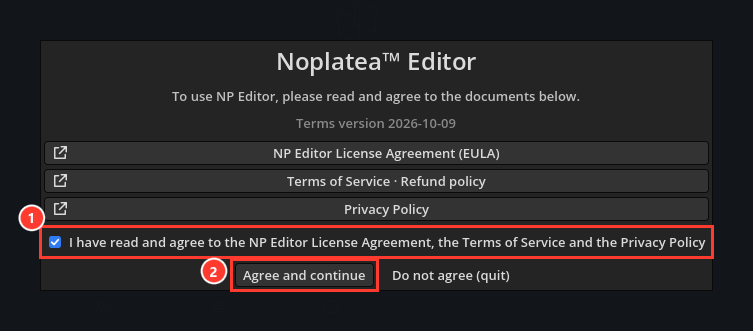
On first launch, the terms screen appears. Click NP Editor License Agreement (EULA), Terms of Service · Refund policy and Privacy Policy to read them in your browser, then click I have read and agree to the NP Editor License Agreement, the Terms of Service and the Privacy Policy to check it, and click Agree and continue. Agree and continue stays disabled until you check the box.
-
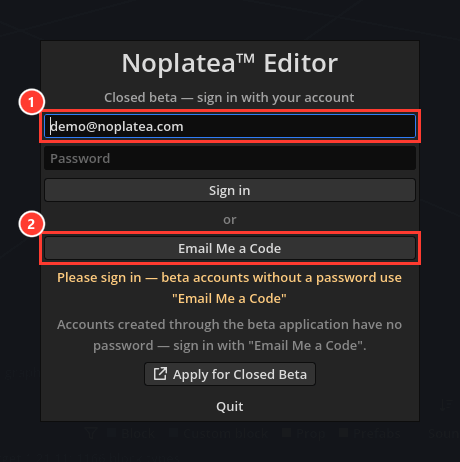
On the sign-in screen, type your account email in the Email field. If your account has a password, type it in the Password field and click Sign in. Accounts created through the closed beta application have no password, so click Email Me a Code.
-
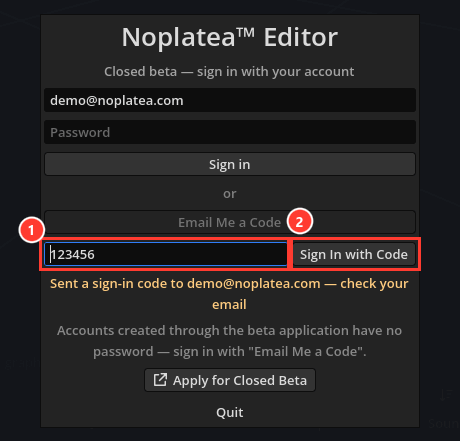
Type the code you received by email in the Code from the email field and click Sign In with Code. This field appears only after the code is sent.
-
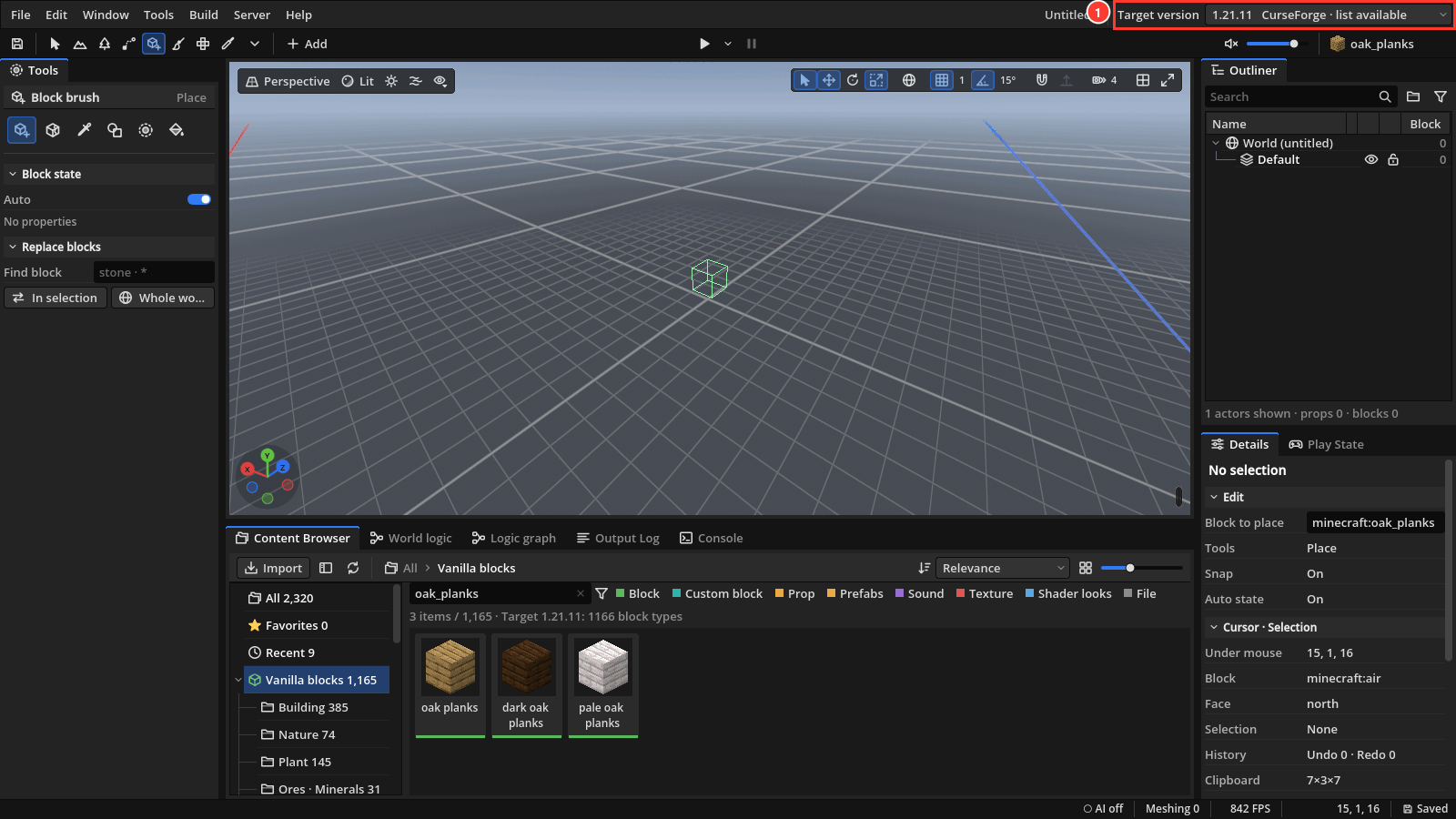
When sign-in and the license check finish, the editor opens with an empty world (“Untitled”). Target version at the right end of the menu bar shows the Minecraft version and launcher name found on this PC.
The editor does not reopen the last world automatically. Open a world with File > Open… (Ctrl+O). Example worlds are in samples\ in the install folder. For the steps to build your first map, see Your first map.
Tips and tricks
Section titled “Tips and tricks”- Sign in without a password: accounts created through the closed beta application have no password, so sign in with Email Me a Code (steps 3–4 above).
- Change the target version: click Target version at the right of the menu bar to open the list of vanilla versions found on this PC. Each row shows “version · launcher name”. Versions without a jar are marked “no jar”, and versions whose block list is already built are marked “list available”. When you pick one, textures switch to that version’s jar, and the block list and export checks follow that version. Your choice is saved in the world file.
- A newly installed version is missing from the list: the editor scans the launcher folders only once at launch. If you installed a new version with the launcher while the editor was running, click File > Rescan launcher folder (version list). The notice “Launcher folder: N vanilla versions — …” appears and the list is refilled.
Reference
Section titled “Reference”What happens on first launch
Section titled “What happens on first launch”| Step | Screen | Details |
|---|---|---|
| 1 | Duplicate launch check | If the editor is already running, it asks “NP Editor is already running. Launch another copy?”. Choose “Yes” to open another window. If you turn on Remember my choice and choose “Yes”, it does not ask again. Change this behavior in Duplicate launch under Edit > Editor Preferences…. |
| 2 | Splash screen | The NP cube and “불러오는 중… · Loading…” appear briefly. |
| 3 | Terms consent | Appears only on first launch and on the first launch of an installed version whose terms have changed. Click Do not agree (quit) to close the editor. |
| 4 | Sign in | Appears when there is no saved sign-in or it has expired. See “Sign-in and license” below. |
| 5 | License check | Without a license, a lock screen appears. |
| 6 | Crash report | The “NP Editor crash report” window appears only if the editor crashed last time. See Troubleshooting. |
The mode is Block brush the first time. After that, the editor starts in the mode you used last.
Sign-in and license
Section titled “Sign-in and license”| Item | Details |
|---|---|
| Sign-in screen | Has the Email and Password fields, Sign in, Email Me a Code, and at the bottom Apply for Closed Beta and Quit. Builds with a support page URL set also show a Support Page button. |
| Getting a new code | 30 seconds after a code is sent, you can click Email Me a Code again. |
| Creating an account | You cannot sign up in the editor. Click Apply for Closed Beta to open the application page in your browser. |
| One account | One Noplatea account works for both the web (account.noplatea.com) and the editor. Even if you signed in on the web, you sign in once more in the editor. For the account page, signing out and deleting your account, see Noplatea account. |
| License | After you sign in, the editor gets a license. The server decides whether you can use the editor: it opens if you have Supporter tier or higher, closed beta approval, the free 14-day trial or an editor pass (see Free trial and devices and Credits and pricing). Otherwise a lock screen appears; after you become a supporter or get approved, click Check again. The 0.10.2 lock screen text still describes the old rule (“…approved beta testers and Builder-or-higher supporters…”), but the actual rule is the one above. |
| Devices | One license works on up to 2 devices. When the limit is reached, “Device limit reached” appears. Release devices you no longer use in the Account section of Edit > Editor Preferences… (up to 3 times in 30 days). |
| Check interval | The account is checked at every launch, and again every 6 hours while the editor is running. |
| Without internet | You can keep working for up to 1 day (24 hours) after the last successful check. After that, “Offline period (1 days) has expired — connect to the internet and sign in” appears. Turning back the PC clock does not extend it. |
| Account menu | Help > Account: Change password · Help > Account: Sign out |
| Sign-in data | %APPDATA%\NPEditor\account.json is encrypted with Windows protected storage (DPAPI). The license is license.json. |
| Reading the terms again | Help > Terms of Service · License (EULA) · Help > Privacy Policy |
AI Studio also uses the account you signed in with in the editor. There is no separate token to enter. See AI Studio in the editor.
Finding the Minecraft jar automatically
Section titled “Finding the Minecraft jar automatically”At launch, the editor looks for vanilla client jars in the launcher folders on this PC. If the same version is in several places, the launcher higher in the table wins. In the Target version list, each one appears with the name in the right column.
| Order | Folder searched | Name in the list |
|---|---|---|
| 1 | %USERPROFILE%\curseforge\minecraft\Install\versions | CurseForge |
| 2 | %APPDATA%\.minecraft\versions | Official launcher |
| 3 | %APPDATA%\PrismLauncher\libraries\com\mojang\minecraft | Prism |
| 4 | %APPDATA%\MultiMC\libraries\com\mojang\minecraft | MultiMC |
| 5 | %APPDATA%\.tlauncher\legacy\Minecraft\game\versions | TLauncher |
| 6 | %APPDATA%\ModrinthApp\meta\versions · %APPDATA%\com.modrinth.theseus\meta\versions | ModrinthApp · Modrinth(com) |
| 7 | %USERPROFILE%\.minecraft\versions | Official launcher (~) |
| 8 | A jar picked with File > Load jar… | Picked manually |
- Only vanilla version folders are used. Mod loader folders such as Forge, NeoForge, Fabric, Quilt and OptiFine are skipped.
- If there is no jar, the notice “Minecraft <version> client jar not found — run that version once in the launcher, or use ‘File → Load jar’” appears. Run that version once in the launcher and click File > Rescan launcher folder (version list), or pick the jar yourself with File > Load jar….
- For a version without a block list (server report), build one with File > Build block list from server jar… (target version). When you pick a server jar, Java generates the data report. It takes tens of seconds, and you do it only once per version. For details, see Minecraft versions.
Inside the install folder
Section titled “Inside the install folder”| Path | Contents |
|---|---|
NPEditor.exe · NPEditor.pck · npeditor.ico | The editor itself and its icon |
data_NPEditor_windows_x86_64\ | .NET runtime and editor libraries |
server\NPBridge.jar | The NPBridge plugin for your Minecraft server. See Installing NPBridge (server admins) |
samples\ | Example worlds castle.npworld · elder_sanctuary.npworld |
licenses\ | License notices (NOTICE.txt · THIRD_PARTY_NOTICES.txt) |
Uninstall.exe | Uninstaller |
The installer creates Noplatea Editor and Noplatea Editor 제거 (Uninstall Noplatea Editor) in the Noplatea Editor folder of the Start menu, and a Noplatea Editor shortcut on the desktop.
Silent install
Section titled “Silent install”You can install from the command line without any screens.
| Task | Command |
|---|---|
| Silent install | NPEditor_Setup_0.10.2.exe /S |
| Silent install to a chosen folder | NPEditor_Setup_0.10.2.exe /S /D=<install folder> (/D= goes last) |
| Silent uninstall | "<install folder>\Uninstall.exe" /S |
If the editor is running during a silent install or uninstall, the installer stops with exit code 5 without asking.
Updating to a new version
Section titled “Updating to a new version”Close the editor, run the new installer and install into the previous install folder.
- Program files (
data_NPEditor_windows_x86_64\, the notice files inlicenses\andserver\NPBridge.jar) are deleted and replaced. Insamples\, only files with the same name are overwritten. - Your worlds, settings, shortcuts and plugins (the user data folder) stay as they are.
- To see which version you have, open Help > About / Licenses. For the changes in each version, see What’s new in 0.10.2.
Uninstalling
Section titled “Uninstalling”Remove “Noplatea Editor” from the app list in Windows Settings, or run “Noplatea Editor 제거” (Uninstall Noplatea Editor) from the Start menu. The uninstaller deletes the shortcuts, the program files, the example worlds the installer added and the registry entries. If files you added yourself remain in the install folder, it leaves the folder in place and shows you the list. The user data folder and world files you saved yourself remain.
Saving and autosave
Section titled “Saving and autosave”| Item | Details |
|---|---|
| World file | .npworld. File > Save (Ctrl+S) · File > Save As… (Ctrl+Shift+S) |
| Project folder | The folder that contains the world file. The custom block and model registry (assets\), prefabs (prefabs\), export results (export\) and screenshots (shots\) are created here. |
| AI chat history | Kept in the <world>.npworld.npchat\ folder next to the world file. |
| Copy before AI jobs | Before an AI Studio job starts, a copy of the current world is kept in .studio_backup\ in the world folder (latest 5). |
| Safe save | The editor writes to a temporary file first and then swaps it in. The previous file is kept as .bak. If the original file cannot be read, the editor restores it from .tmp or .bak the next time you open it. |
| Autosave | If anything changed, the editor saves in the background every 120 seconds. The original file is not touched. Beyond 10 files, the oldest are deleted first. |
| Loading an autosave | File > Load autosave opens the newest autosave file. After opening it, save with File > Save As…. |
| On quit | If there are unsaved changes, the editor asks “There are unsaved changes. Quit without saving?” (Quit without saving · Save and quit · Cancel). Even if you quit without saving, the changes are kept in the autosave file. |
| Switching maps | Before New, Open or Load autosave, if there are unsaved changes, the editor asks you to choose Save, Don’t Save or Cancel. |
Change the autosave interval and the number of files kept in “Autosave” in Settings.
User data folder
Section titled “User data folder”| Folder · file | Contents |
|---|---|
%APPDATA%\NPEditor\settings.cfg | Editor preferences · docking layout · view settings |
%APPDATA%\NPEditor\shortcuts.json | Changed shortcuts |
%APPDATA%\NPEditor\autosave\ | Autosave files |
%APPDATA%\NPEditor\project\ | Project folder for a world that is not saved yet |
%APPDATA%\NPEditor\plugins\ · plugins_state.json · plugin_settings\ | External plugin folder · on/off state · per-plugin settings |
%APPDATA%\NPEditor\account.json · license.json · terms_consent.json | Sign-in data · license · terms consent record |
%APPDATA%\NPEditor\server_link.json | Server connection settings |
%APPDATA%\NPEditor\chats\ | Where AI chat history goes when the world folder is not writable |
%APPDATA%\NPEditor\logs\ | Run logs (log files) and the error collection np_editor_errors.log |
%APPDATA%\NPEditor\crash\ | Where crash reports are collected before they are sent |
%LOCALAPPDATA%\NPEditor\versions\<version>\ | Per-version block list (server report) cache |
%LOCALAPPDATA%\NPEditor\texture_index\ · block_colors\ | Texture index · block color cache (no images are stored) |
Documents\NPEditor\looks\ · Documents\NPEditor\shaderpacks\ | Saved atmosphere and lighting looks · shader packs you made |
You can delete the cache folder (%LOCALAPPDATA%\NPEditor\). It is rebuilt the next time it is needed.
Related pages
Section titled “Related pages”Not an official Minecraft product. Not approved by or associated with Mojang or Microsoft.