
Sample: event_example
Overview
Section titled “Overview”A sample that adds three NPC talk · quest types to world logic. It has the id event_example, SDK ^1.2 and version 1.0.0, and appears in the Plugin Manager as 씬 이벤트 예제 (NPC 대화 · 퀘스트) (scene event sample: NPC talk · quest). It shows all three roles of AddSceneEvent (trigger · condition · action), both with and without Simulate. The sample’s UI text is Korean only, so this page quotes it as shown on screen, with an English gloss.
| What it shows | type |
|---|---|
A trigger without Simulate (fired only with the Fire button) | npc_talk |
A condition with Simulate (decided from state the plugin remembers) | quest_state |
An action with Simulate (logs + changes state) | quest_start |
Actor · Text · Enum · Bool fields | Fields of the three types |
Summary templates | All three types |
The source is in samples/plugins/event_example/ in the NP Editor repository (Plugin.cs · EventExample.csproj · plugin.json). To run it on the game server, you need the NPBridge server plugin and handlers for the same types (see “Server-side behavior” below).
Basic use
Section titled “Basic use”Create a rule that “starts quest q1 the first time a player talks to an NPC”, then test it in Play.
-
From the repository root, run
dotnet build samples/plugins/event_example/EventExample.csproj -c Release. The output goes to%LOCALAPPDATA%\NPEditorBuild\EventExample\bin\Release\net8.0\. -
Copy
EventExample.dllandplugin.jsonfrom the output to%APPDATA%\NPEditor\plugins\event_example\. Do not includeNP.Editor.Sdk.dll. -
Click Tools > Plugin Manager…, then check Enable on the row shown as “Approval needed”. When the Registered column shows
씬 이벤트 3, the plugin is on.Known issue in 0.10.2: the Registered column shows the registration summary in Korean.
씬 이벤트 3means “Scene events 3”. -
Place one scene actor of kind
display,textorspawn. This is the NPC. -
Click Tools > World logic to open the panel, and create a new rule.
Known issue in 0.10.2: the name field at the top of the new rule shows the Korean default name “새 규칙”, while the rule list shows “New rule”.
-
As the trigger, select
NPC 에게 말 걸 때(when talking to an NPC) in the퀘스트(예제)(quest, sample) group, then select the actor from step 4 in theNPCfield. -
Add
퀘스트 상태(quest state) as a condition and typeq1in theQuest idfield. LeaveStatusatnone. -
Add
퀘스트 시작(start quest) as an action and typeq1in theQuest idfield. The rule’s one-line summary appears as “플레이어가 NPC 「」 에게 말을 걸면” (when a player talks to NPC 「 」). -
Click Play test in the panel to start Play, then click Fire on that rule. The log list at the bottom of the panel shows a
[event_example] 퀘스트 q1 시작 → <player>(quest q1 started) line.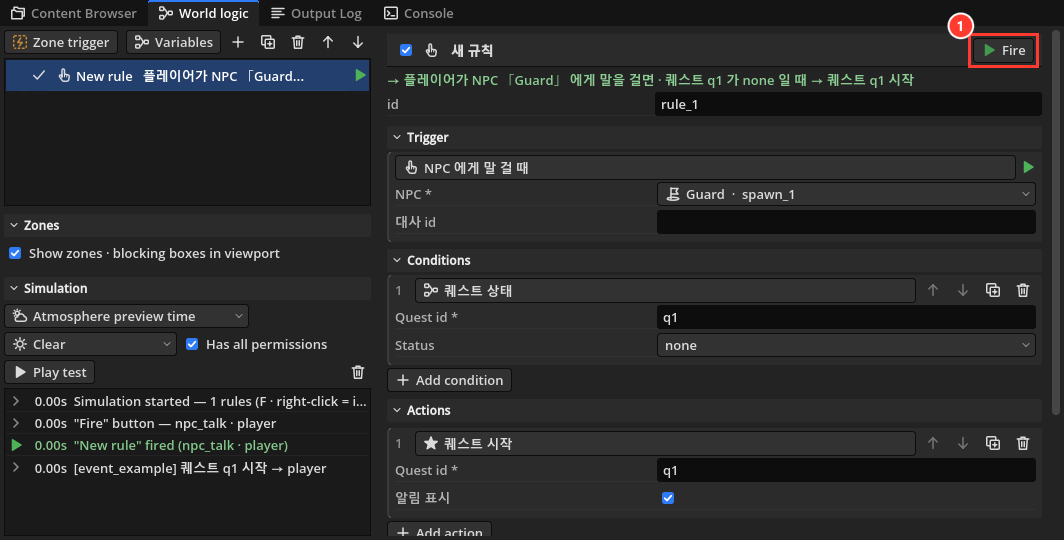
-
Click Fire once more. The state is now
active, so the condition is false and the action does not run.
Tips and tricks
Section titled “Tips and tricks”- The same rule appears as three nodes in the Logic graph. You can connect the NPC actor to the
NPCfield pin. - The quest state the plugin remembers stays even if you stop and restart Play. To test from the beginning again, reopen the world (the state is cleared in
WorldChanged). - If you click Fire while Play is not running, Play starts first.
- When you make your own plugin, copy this sample and prefix the type names with your own name (
myquest_npc_talk…).
Reference
Section titled “Reference”What it adds
Section titled “What it adds”| Kind | Name | Description |
|---|---|---|
| World logic trigger | npc_talk NPC 에게 말 걸 때 | When a player starts talking to an NPC. Fired by the server plugin. In the preview it fires only with the Fire button. Icon interact |
| World logic condition | quest_state 퀘스트 상태 | True when the triggering player’s quest is in that state. Icon logic |
| World logic action | quest_start 퀘스트 시작 | Sets the triggering player’s quest to active. Icon star |
| Event | WorldChanged | Clears the preview quest state. |
All three types are in the menu group 퀘스트(예제).
npc_talk (trigger)
Section titled “npc_talk (trigger)”One-line summary: 플레이어가 NPC {npc} 에게 말을 걸면 (when a player talks to NPC {npc})
| Field | Type | Required | Default | Description |
|---|---|---|---|---|
npc | Actor (display · text · spawn) | Yes | — | The NPC actor being talked to |
line | Text | No | — | Dialogue line id. If empty, any line |
quest_state (condition)
Section titled “quest_state (condition)”One-line summary: 퀘스트 {quest} 가 {state} 일 때 (when quest {quest} is {state})
| Field | Type | Required | Default | Description |
|---|---|---|---|---|
quest | Text | Yes | — | Quest id |
state | Enum (none · active · done) | No | none | State |
quest_start (action)
Section titled “quest_start (action)”One-line summary: 퀘스트 {quest} 시작 (start quest {quest})
| Field | Type | Required | Default | Description |
|---|---|---|---|---|
quest | Text | Yes | — | Quest id |
notify | Bool | No | true | Show a notification |
It is saved in scene.json like this (part of a rule).
{ "trigger": { "type": "npc_talk", "npc": "npc_guard" }, "conditions": [ { "type": "quest_state", "quest": "q1", "state": "none" } ], "actions": [ { "type": "quest_start", "quest": "q1" } ]}Server-side behavior
Section titled “Server-side behavior”This sample covers only the editor side. To run the rules on the game server, register handlers for the same three types with SceneEventsApi in the server plugin NPBridge. The registration code is under “Server side” in Adding world logic types.
| type | What the server handler does |
|---|---|
npc_talk | Fires the rules whose npc (and line) match on an NPC talk event |
quest_state | Reads the triggering player’s state from the quest store and compares it |
quest_start | Sets the quest to active, and shows a notification if notify is set |
A server without handlers skips these types with one warning. npc_talk rules do not run.
Limitations and known issues
Section titled “Limitations and known issues”- The preview quest state exists only in editor memory. It is cleared on new world · open · plugin disable, and is not shared with the server.
- The
notifyfield ofquest_startand thelinefield ofnpc_talkare not used in the preview. - The type names have no plugin prefix (
npc_talk…). They are kept short because this is a sample. If another plugin registers the same type first, this sample does not enable (“Version mismatch”). - When the plugin is disabled, rules that use these types get an “Unknown type” warning. The rules and field values are not deleted.
- If you move the sample out of the source tree to build it, change the csproj’s SDK project reference to a reference to
NP.Editor.Sdk.dllin the install folder, as in Quick start.
Changelog
Section titled “Changelog”| Version | Date | Details |
|---|---|---|
| 1.0.0 | 2026-10-04 | First version (SDK 1.2): trigger npc_talk · condition quest_state · action quest_start |
Related pages
Section titled “Related pages”Not an official Minecraft product. Not approved by or associated with Mojang or Microsoft.