
Tutorial "Mulgyeol" part 3 — Villagers and trading
Overview
Section titled “Overview”Five villagers live in Mulgyeol: the fisher Gangmuli, the woodcutter Dandani, the miner Banjjaki, the farmer Deulpuli, and the general-store keeper Altteuli. In this part you build the fisher Gangmuli from scratch, making every piece of “trading without windows” once. You use no dialogue or shop windows. Talking, buying and selling, and getting items are all done by looking at something and clicking (in ▶ Play, F or right-click).
| What you do | What you build |
|---|---|
| Make a villager | A moving model (display actor + animation) · a name tag (component Text display) · a talk zone · a talk rule |
| Money | A per-player variable money (initially 1000) · “Money 1000” on the action bar every 1.5 seconds |
| Buying | A stall (base block · item · price text · zone) + 3 rules — buy when you have the money, a hint when you are short |
| Selling | A sales chest (chest block · text · zone) + 3 rules — sell all the apples in your bag and your money grows |
| Getting items | A gathering spot (text · zone) + 1 rule — gives an item once every 5 seconds |
One loop in Mulgyeol goes like this: get apples from the farmer’s apple tree → sell apples at the fisher’s sales chest (30 each) → buy a lantern at the fisher’s stall (120). You start with 1000, and at the general-store keeper’s stall you save toward a beacon (1500).
Preparation: in samples\showcase\ of the install folder, 7 villager, dancer, and protagonist models are in the models\ folder and already registered in the registry (assets\registry.json). The rule pictures (steps 6 to 9 and 13 to 15) show the bottom area enlarged and the left and right areas collapsed (the “Left area”, “Right top area”, and “Right bottom area” checks in the Window menu). You can follow along without the same screen, but before steps 10 to 12 (typing positions in Details) and before ▶ Play, turn the collapsed areas back on. If the front of a position number in Details looks cut off (181.5 shown as “81.5”), drag the left border of the right column to widen it (pictures 03 and 05 were taken cut off, but the values are 181.5, 70.04, 213.5 for 03 and 181.5, 70, 213.5 for 05).
A note on input fields: right after you type a value into a text or number field, Shift, WASD, and the number keys in ▶ Play go into that field and do not work. Put the mouse over the viewport and scroll the wheel one notch to leave the field, then click ▶ (it is fine if the view moves a little).
This tutorial’s sample world uses Korean names and messages. Type the Korean values given in code format exactly as shown, so your world matches the sample and the pictures; the English in parentheses is only a gloss.
Starting file for this part
Section titled “Starting file for this part”Open it the same way as “Starting file for this part” in part 2. In Explorer, copy the whole samples\showcase folder under your own working folder (if you already copied it in part 2, use that folder), open mulgyeol_start3.npworld in that folder with File > Open…, and immediately save it in the same folder as mulgyeol_part3.npworld with File > Save As…, then start. The sky, the registry (assets\), and the models (models\) must be in the folder together for the sky and models to look like the pictures. The 7 models (mg_fisher and others) should show in the Content Browser under props, and the woodcutter, miner, farmer, and shopkeeper should stand in human shape (if you see magenta boxes, the registry did not come along — check that you copied the whole folder). This file contains the part 2 cutscene and the following.
- 4 villagers (woodcutter, miner, farmer, shopkeeper): finished, with model, name tag, talk zone, and talk rule.
- 3 stalls (cake, poppy, beacon) · 3 sales chests · 3 gathering spots (apples, ore vein, log): the blocks, text, and zones are placed. The gathering rules exist; the buying and selling rules do not exist yet because there is no money.
- What is missing: everything for the fisher Gangmuli, and the money variable, the money display, and all buying and selling rules. You build the fisher’s part yourself in this part. For the other stalls and sales chests, copy the fisher’s rules and change only the ids and values; they are all built in the finished map (
mulgyeol_final.npworld).
Basic use
Section titled “Basic use”Make the fisher
Section titled “Make the fisher”-
In the Content Browser in the bottom area, open Prop and type
mg_fisherin the search field. One fisher model in a yellow raincoat appears. This model has 11 bones and 6 animations (idle_a·idle_b·idle_c·bow·dance·hero_stand). To use your own model, bring in a.bbmodelwith Import (the file name becomes the id as is).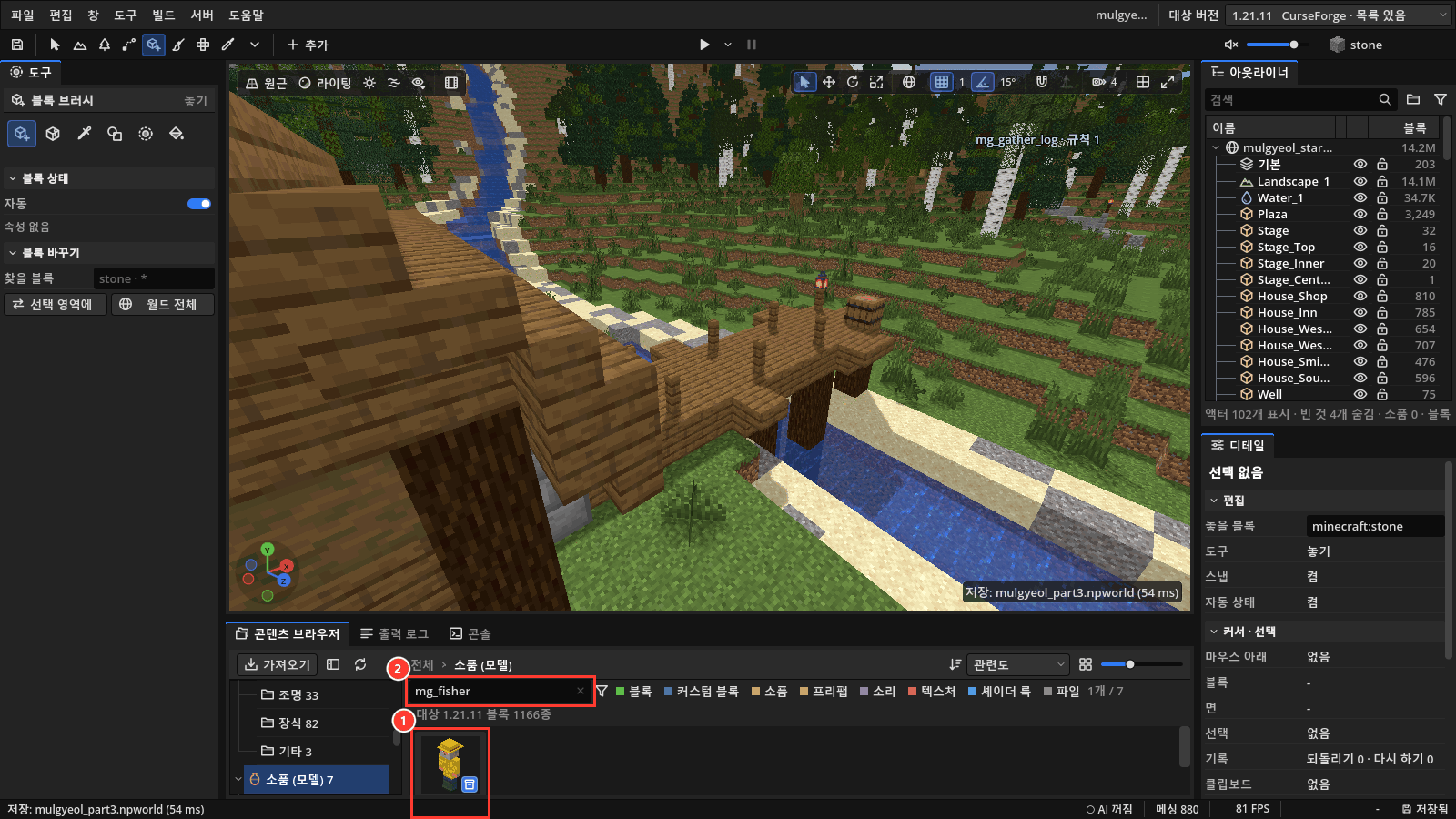
-
Click Add on the toolbar, type
item modelin the search field, and double-click Display — item model (Item Display). A display actor is placed and selected.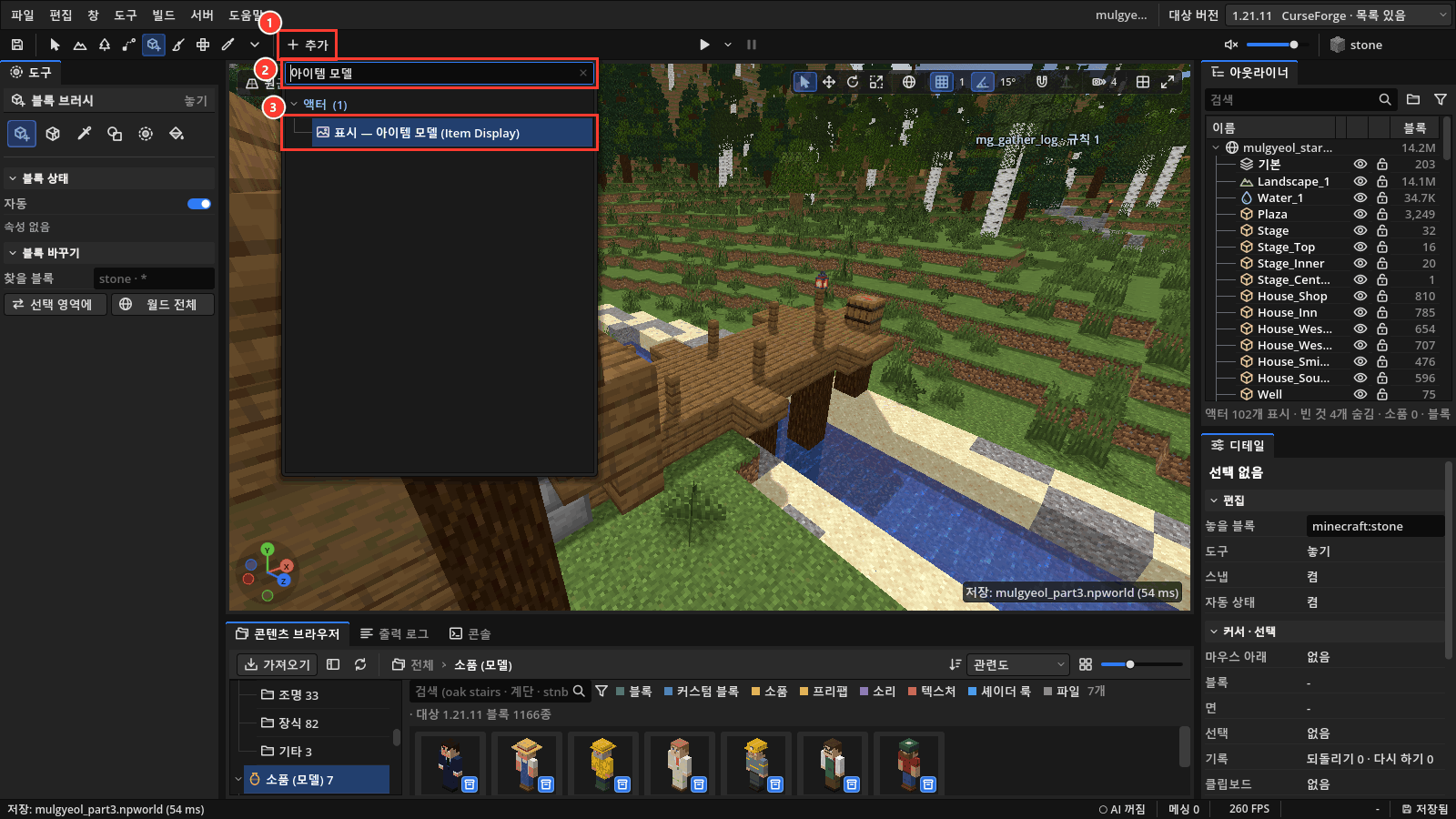
-
In Details, set Model to
mg_fisherand Animation toidle_a. Type181.5,70.04,213.5in the X, Y, Z fields of the Position row and90in the first field (yaw) of the Rotate row. Type어부 강물이(Fisher Gangmuli) in Name at the top andmg_fisherinidbelow. Write theidin English letters. The rules point to the actor by this id.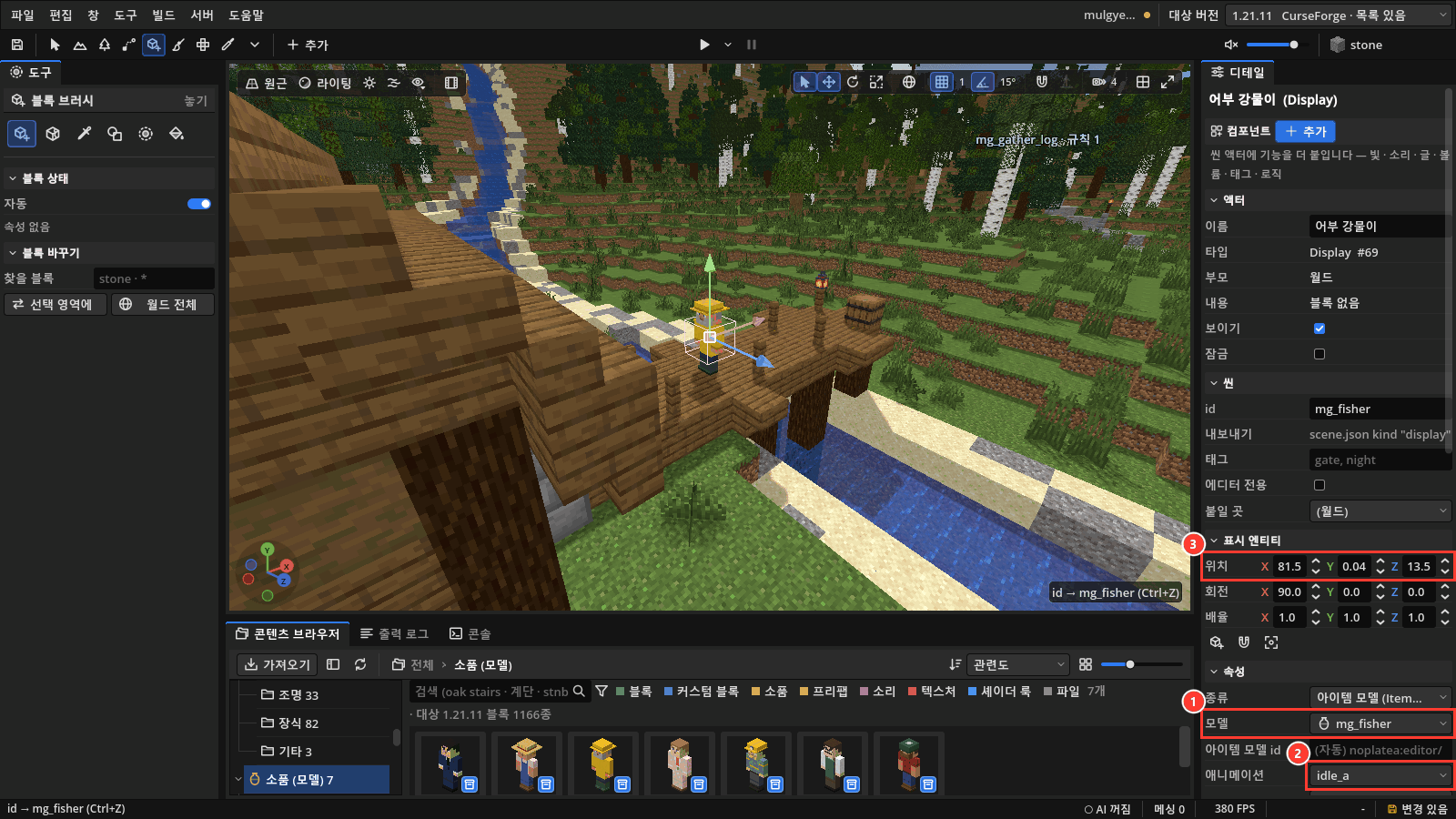
The position of a display actor is the center of the model’s bounds. The fisher is a little over 2 blocks tall, so place him about 1 block above foot height (69) (70.04 in the picture).
-
Under Components at the top of Details, click Add and choose Text display. Type
어부 강물이in Text,1.5in the middle field (Y) of Offset,#fff4c8in Text color, and#70000000in Base. A name tag appears above the head andmg_fisher.labelis added in the outliner.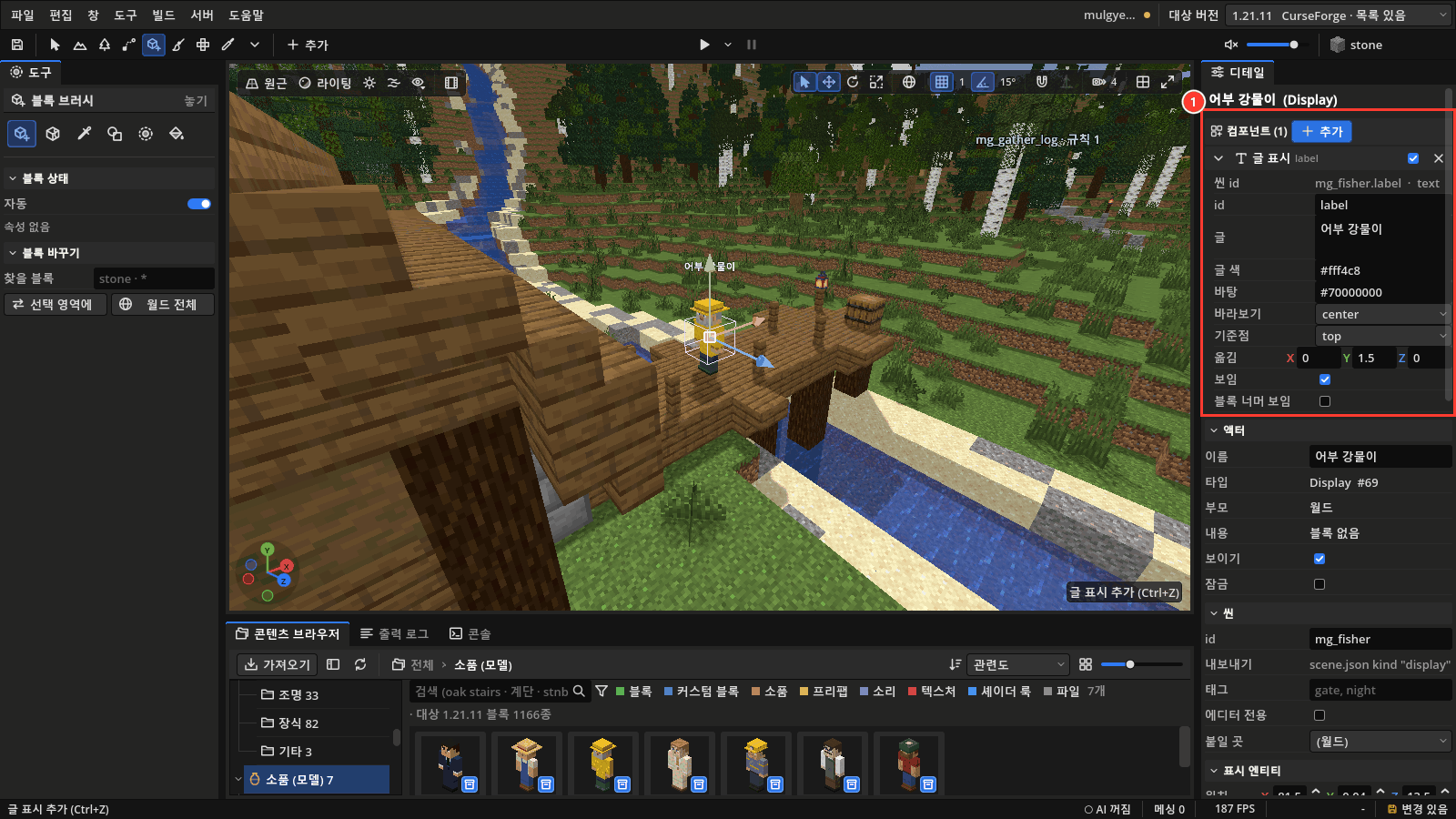
-
Make the zone where you talk to the fisher. Under Add on the toolbar, place Trigger zone — box (4×3×4), and in Details type
1,2,1in the X, Y, Z fields of the Size row and181.5,70,213.5in the Position row. Type어부 말 걸기(Talk to fisher) in Name andmg_fisher_talkinid. It overlaps the model at the same spot, so if you look at the fisher and press F, you trigger this zone.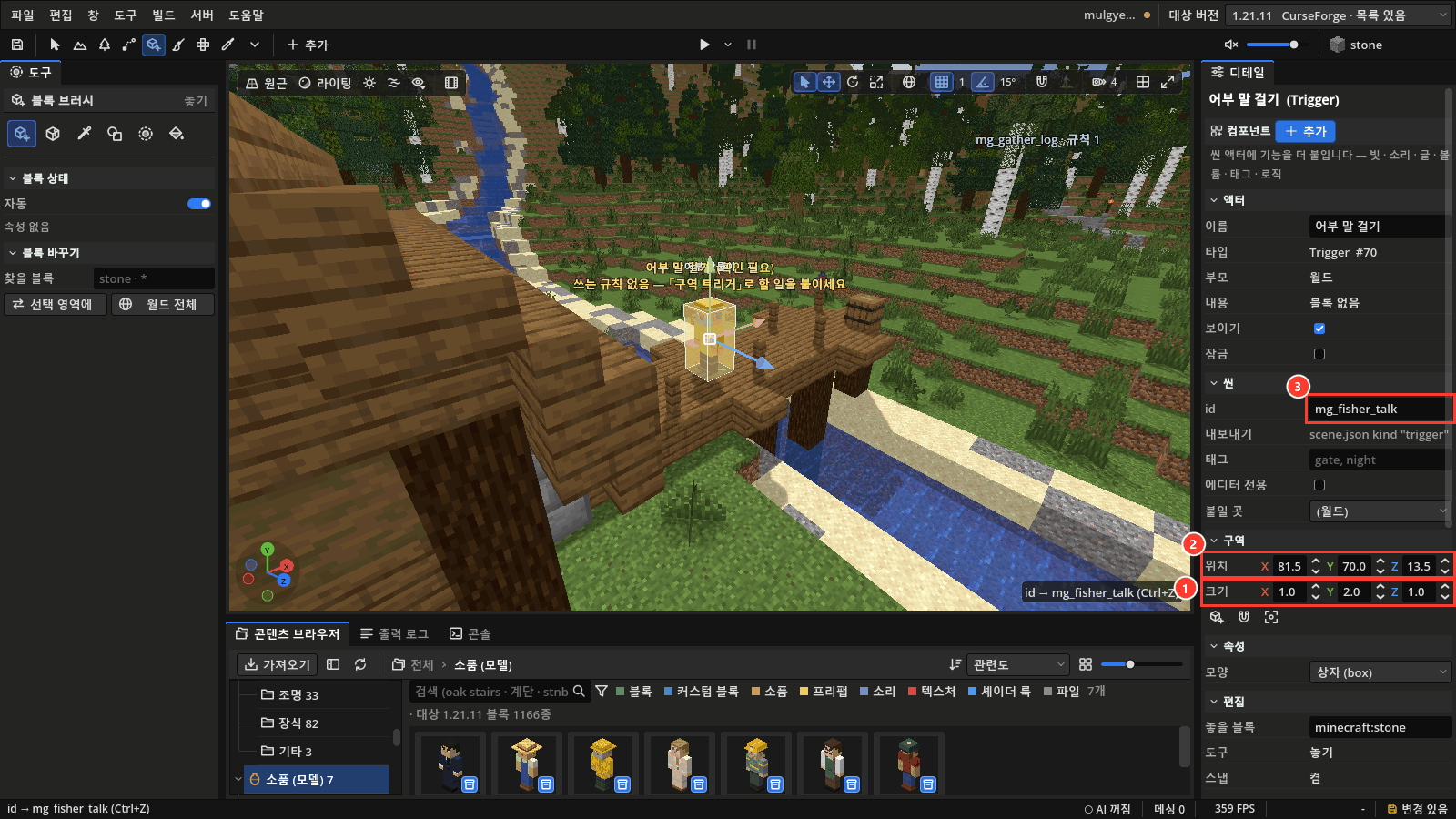
-
In the World logic tab of the bottom area, click the ”+” (new rule) at the top left. The
idfield in the properties starts asrule_1. Click the field, select all with Ctrl+A, typer_talk_mg_fisher, and confirm with Enter (it changes only after you press Enter. If you move to another field without Enter, the text you typed stays in the field but the rule id is stillrule_1, and the field returns torule_1the next time the screen is redrawn, such as when you add an action). For the rule name, select all in the bold field above theidrow (it starts as “New rule”) the same way and type어부 강물이 말 걸기(Fisher Gangmuli talk). Clear and type theidand name fields of later rules the same way. Change the trigger to Right-click actor and choose어부 말 걸기 · mg_fisher_talkin Actor. In Text of the default Chat message, type어부 강물이: 강물이 맑아서 오늘은 대구가 잘 잡혀요.(“Fisher Gangmuli: The water is clear, so the cod are biting today.”). With Add action, add Wait (s1.5) and Chat message (Text어부 강물이: 사과를 가져오면 한 알에 30원 쳐 줄게요. 나루 끝에서 낚시도 해 보고요., “Fisher Gangmuli: Bring me apples and I’ll pay 30 each. Try fishing at the end of the pier too.”). Type3in Cooldown under the filter.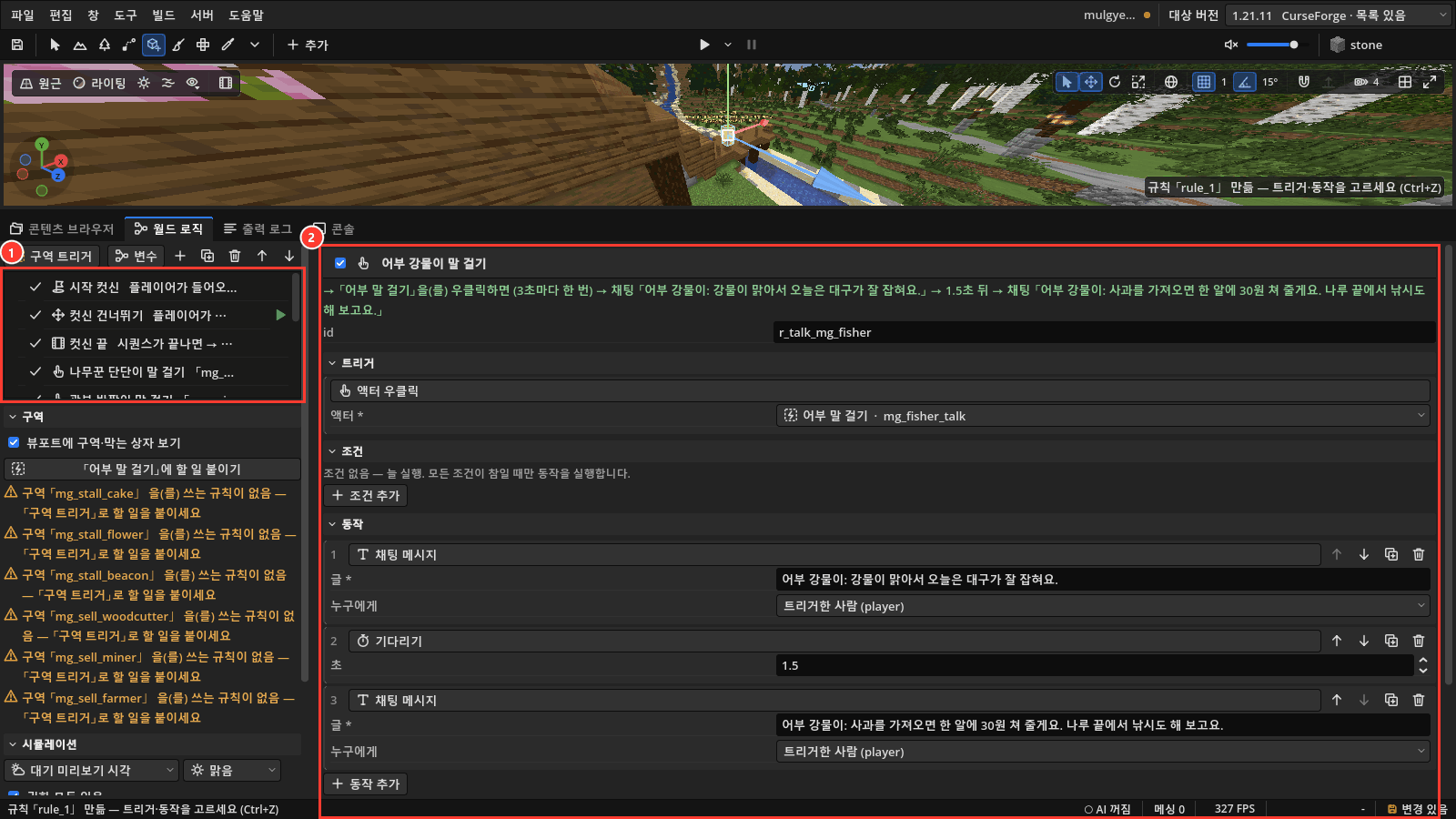
-
Click Variables in the World logic tab. With Add variable, enter the name
money, typeint, scope Player, and initial value1000, then click Apply. The initial scope value is “Global”, so always change it to Player (with global, everyone shares one amount of money).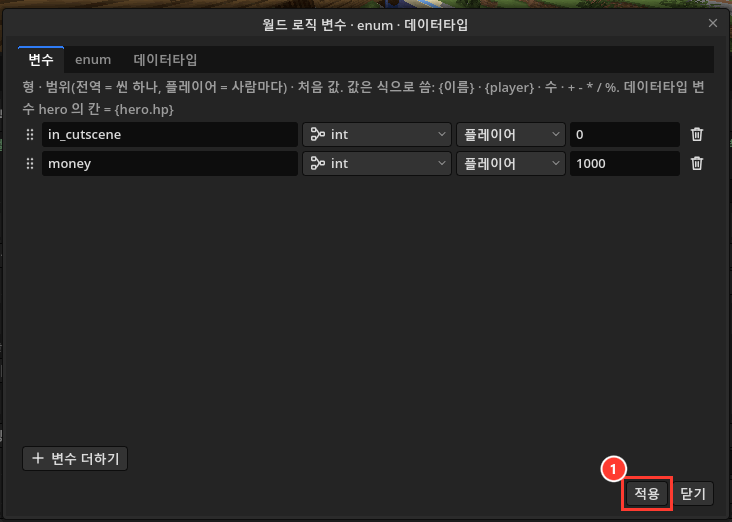
-
Make the function that shows the money. In a new rule, set
idfn_show_money(confirm with Enter) and name돈 표시(Show money). In the trigger Function, typeshow_moneyin Function name. With Add condition, add Compare (Left{in_cutscene}· Compare==· Right0), and change the action to Action bar text (Text돈 {money}원, “Money {money}”). During the cutscene (in_cutsceneis 1), this function is skipped and no money shows.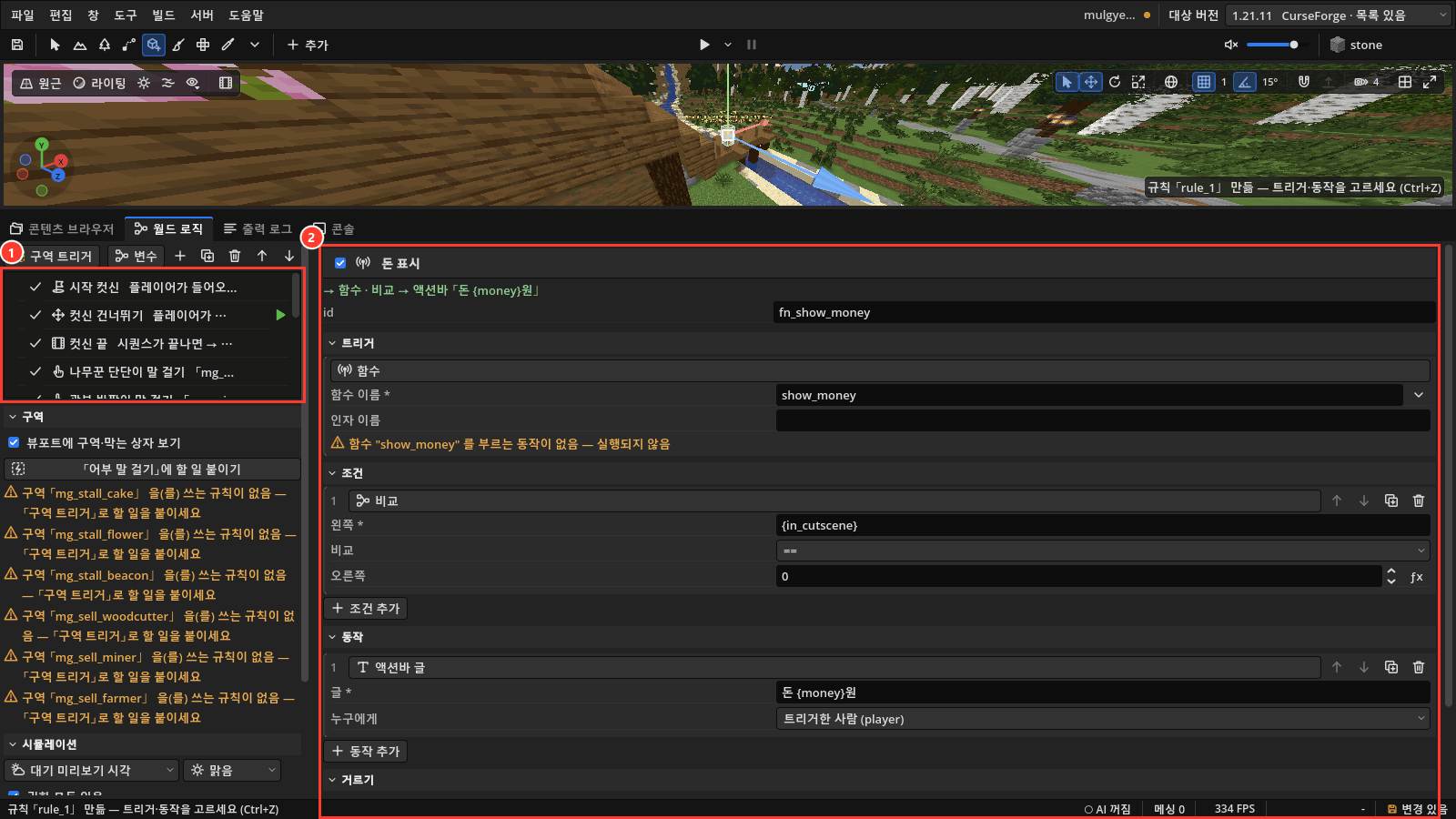
-
Call this function for all players every 1.5 seconds. In a new rule, set
idr_money_tick(confirm with Enter) and name돈 표시 되풀이(Repeat money display). The trigger is Timer (global) with Interval (s)1.5. Change the type of action 1 to For each player, with Functionshow_moneyand To whom left atworld. It is called for each player, so each person sees their own money. If you read a variable directly inside a global timer rule, it reads the global value.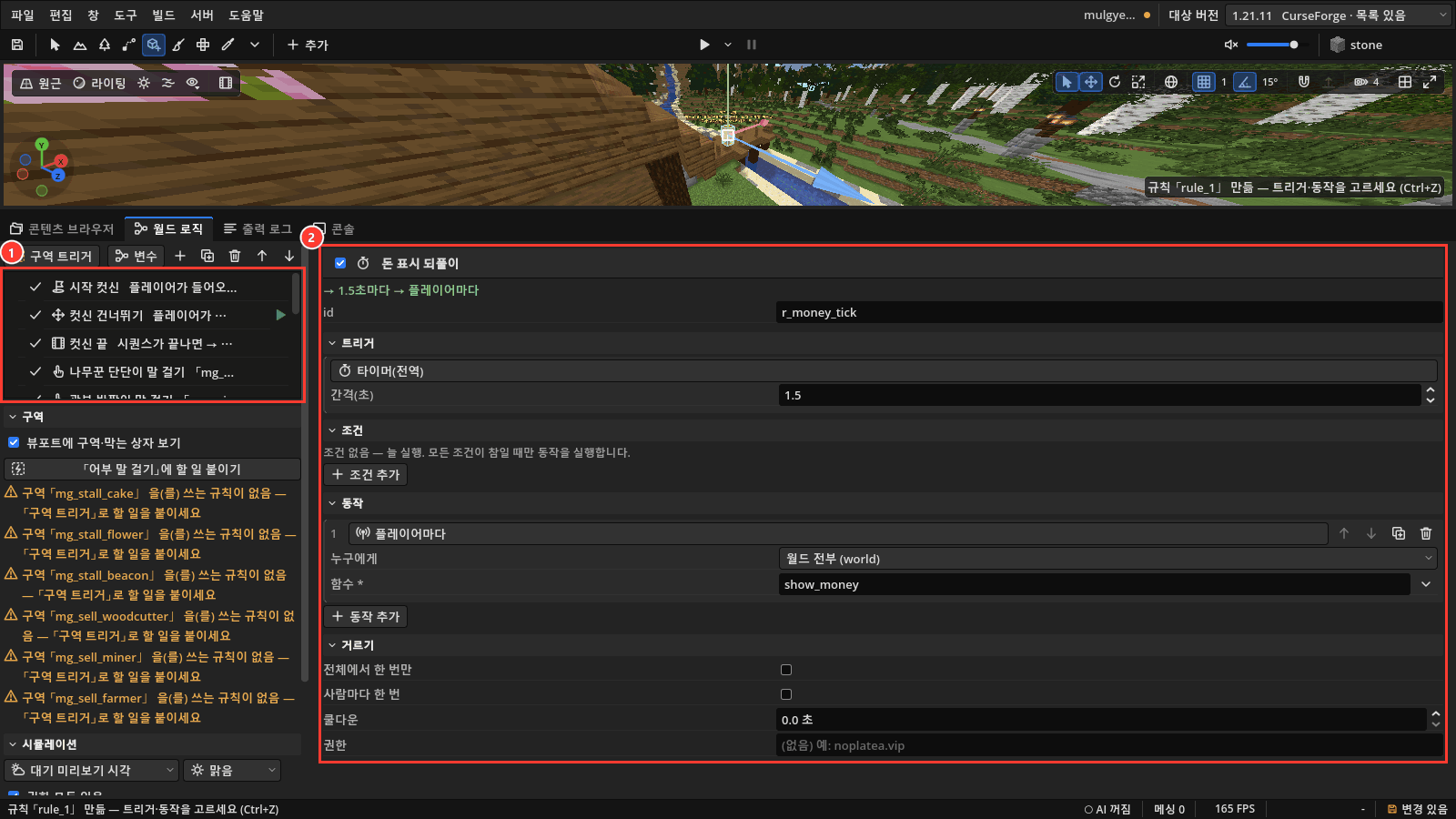
The action bar is a single line, so it covers other hints. Send hint text through chat or a title, and on the server also use the Sidebar action so the money is always visible (the finished map’s
fn_show_moneydoes it that way). ▶ in the editor does not draw the sidebar, so this tutorial builds only the action bar.
Stall, sales chest, and fishing spot
Section titled “Stall, sales chest, and fishing spot”-
Make a lantern stall on the road beside the fisher’s hut. With the block brush, place one
spruce_planks(spruce planks) block at177, 68, 219. The coordinates of the block under the mouse appear in “Under mouse” in Details, and clicking the top face of that block places it on the block directly above. Then place the 3 actors in the table below with Add on the toolbar and enter the values. Type theidin the first column of the table exactly into theidfield of Details (that way it shows in the Actor field in steps 13 to 15). To match the pictures, type the Name from the table. The Block field starts with another block name, so click the field, clear it with Ctrl+A and Delete, type the new one, and confirm with Enter for it to change.Actor ( id)Name Type (Add item) Position Other fields mg_stall_lantern_item등불 진열 물건(Lantern display item)Display — block (Block Display) 177.5, 69.36, 219.5Block minecraft:lantern[hanging=false]· Multiplier0.7, 0.7, 0.7· Rotate yaw20mg_stall_lantern_txt등불 값 글(Lantern price text)Text (hologram Text Display) 177.5, 70.25, 219.5Text 등불 120원(Lantern 120)mg_stall_lantern등불 진열대(Lantern stall)Trigger zone — box 177.5, 69, 219.5Size 1.2, 2, 1.2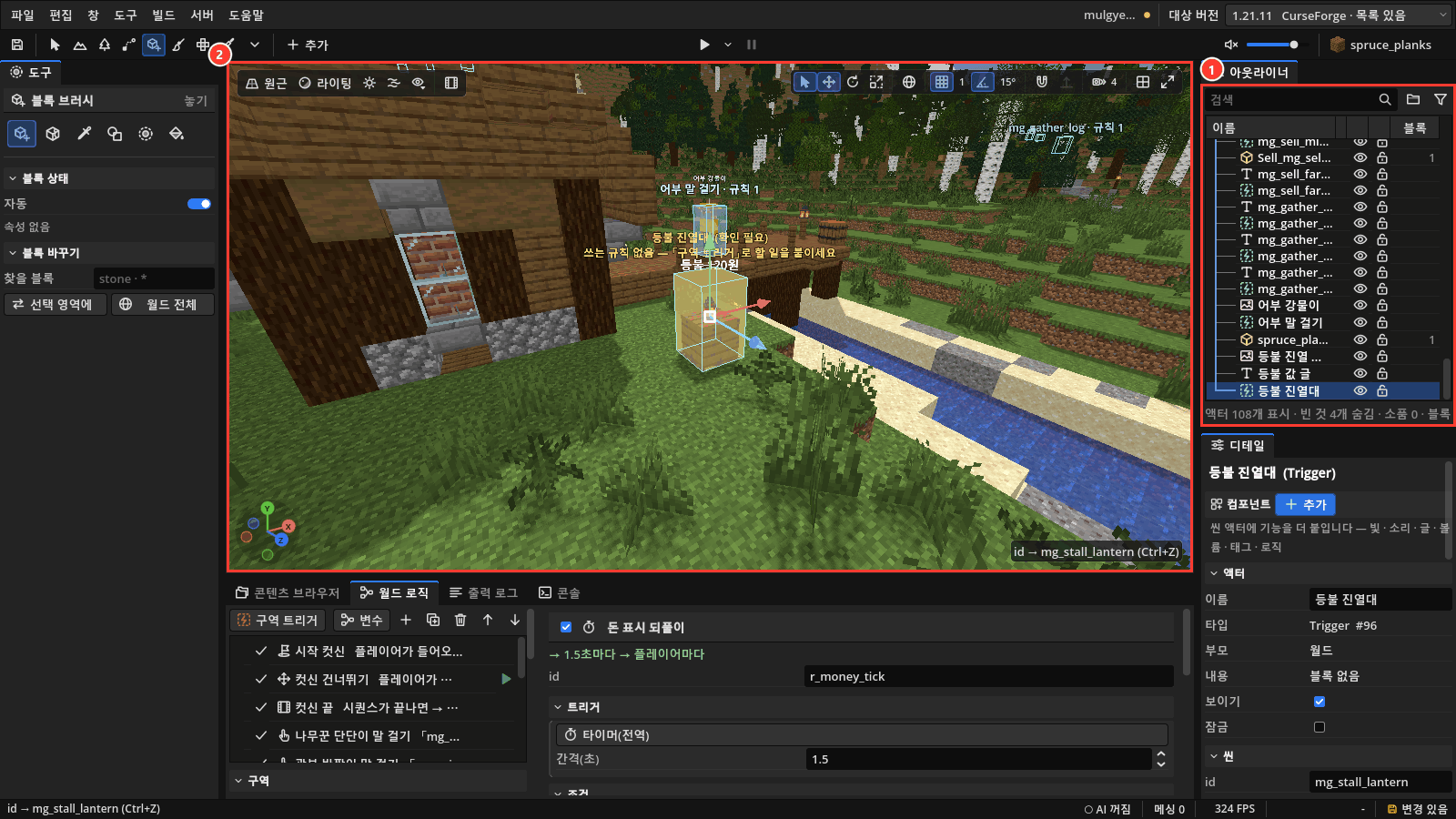
-
Make the sales chest. Place a
chest[facing=south]block at183, 69, 212and place 2 actors.Actor ( id)Name Type Position Other fields mg_sell_fisher_txt사과 삽니다 글(Buying apples text)Text 183.5, 70.6, 212.5Text 사과 삽니다 · 1알 30원(Buying apples · 30 each)mg_sell_fisher사과 판매 상자(Apple sales chest)Trigger zone — box 183.5, 69.5, 212.5Size 1.2, 1.2, 1.2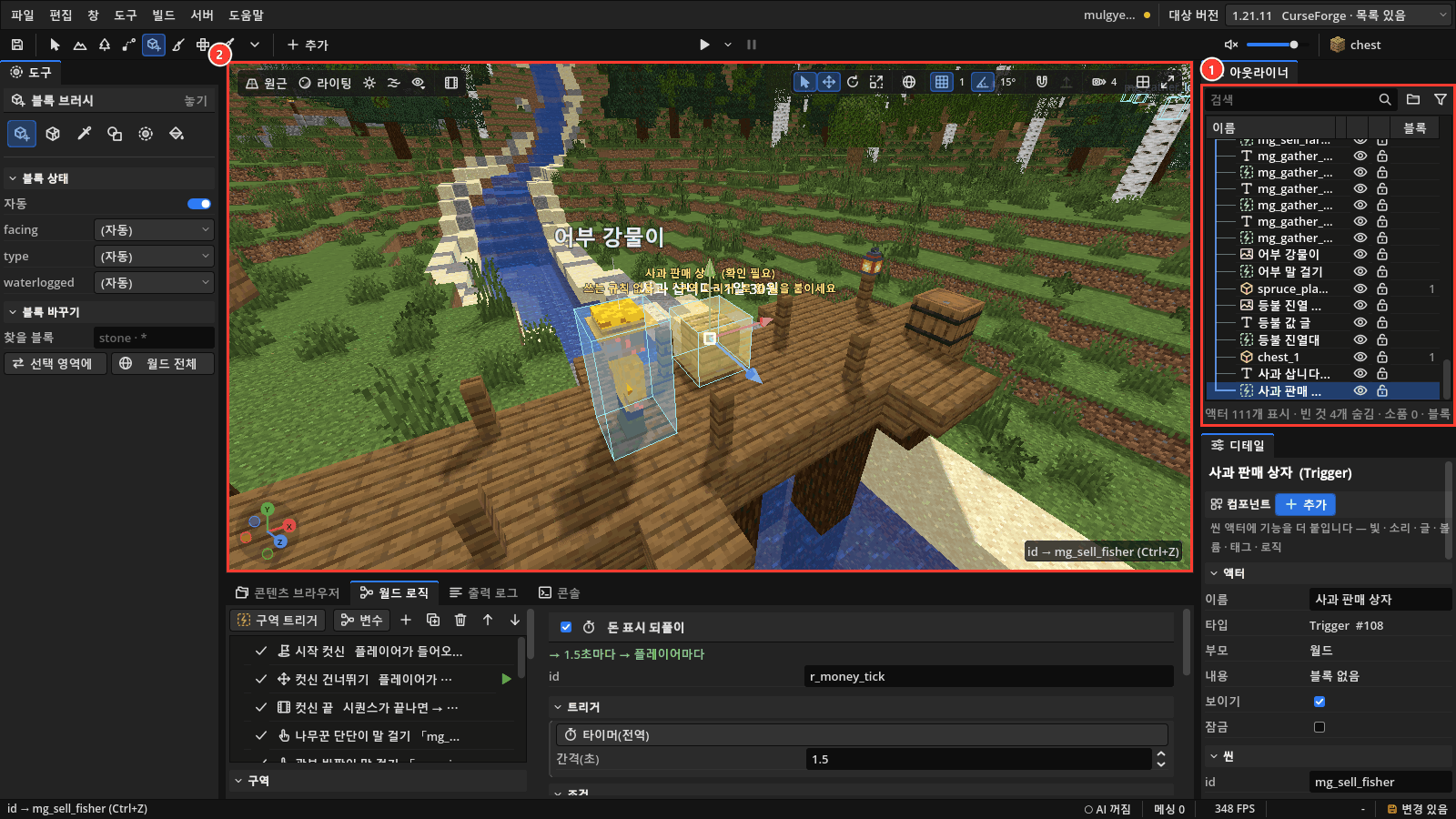
-
Make the fishing spot (there is no block).
Actor ( id)Name Type Position Other fields mg_gather_fish_txt낚시 자리 글(Fishing spot text)Text 187.5, 71, 213.5Text 낚시 자리 (F)(Fishing spot (F))mg_gather_fish낚시 자리(Fishing spot)Trigger zone — box 187.5, 69.5, 213.5Size 2, 3, 2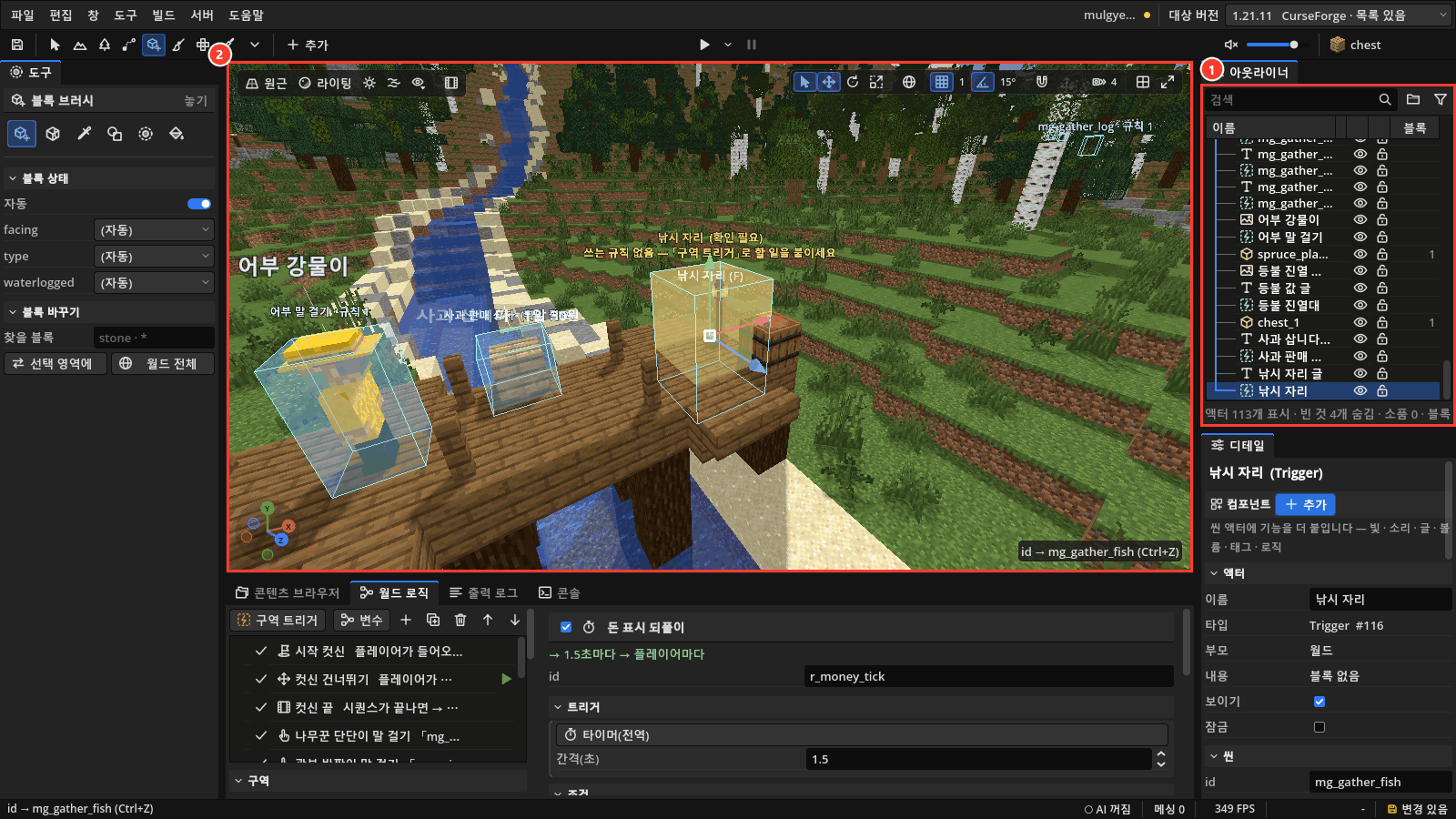
Trading rules
Section titled “Trading rules”-
For every rule, type the
idand confirm with Enter. Action 1 of a new rule starts as Chat message, so change its type to the first action in the table and add the rest with Add action. There are 3 buying rules. A branch (if) calls a function to do its work, so make the two function rules first and the right-click rule last (a rule that points to a function that does not exist is created, but the check marks it with the error “Missing function “name"").id Trigger Actions fn_buy_mg_stall_lanternFunction · function name buy_mg_stall_lanternSet variable (Variables money· Calculatesub· Values120) → Give item (Itemminecraft:lantern· Count 1) → Chat message (등불을 샀습니다. 남은 돈 {money}원, “You bought a lantern. Money left {money}”)fn_short_mg_stall_lanternFunction · function name short_mg_stall_lanternChat message ( 돈이 모자랍니다. 등불 120원 · 가진 돈 {money}원, “Not enough money. Lantern 120 · you have {money}”)r_buy_mg_stall_lanternRight-click actor · Actor mg_stall_lantern· cooldown0.5Branch (if) (Left {money}· Compare>=· Right120· If truebuy_mg_stall_lantern· If falseshort_mg_stall_lantern)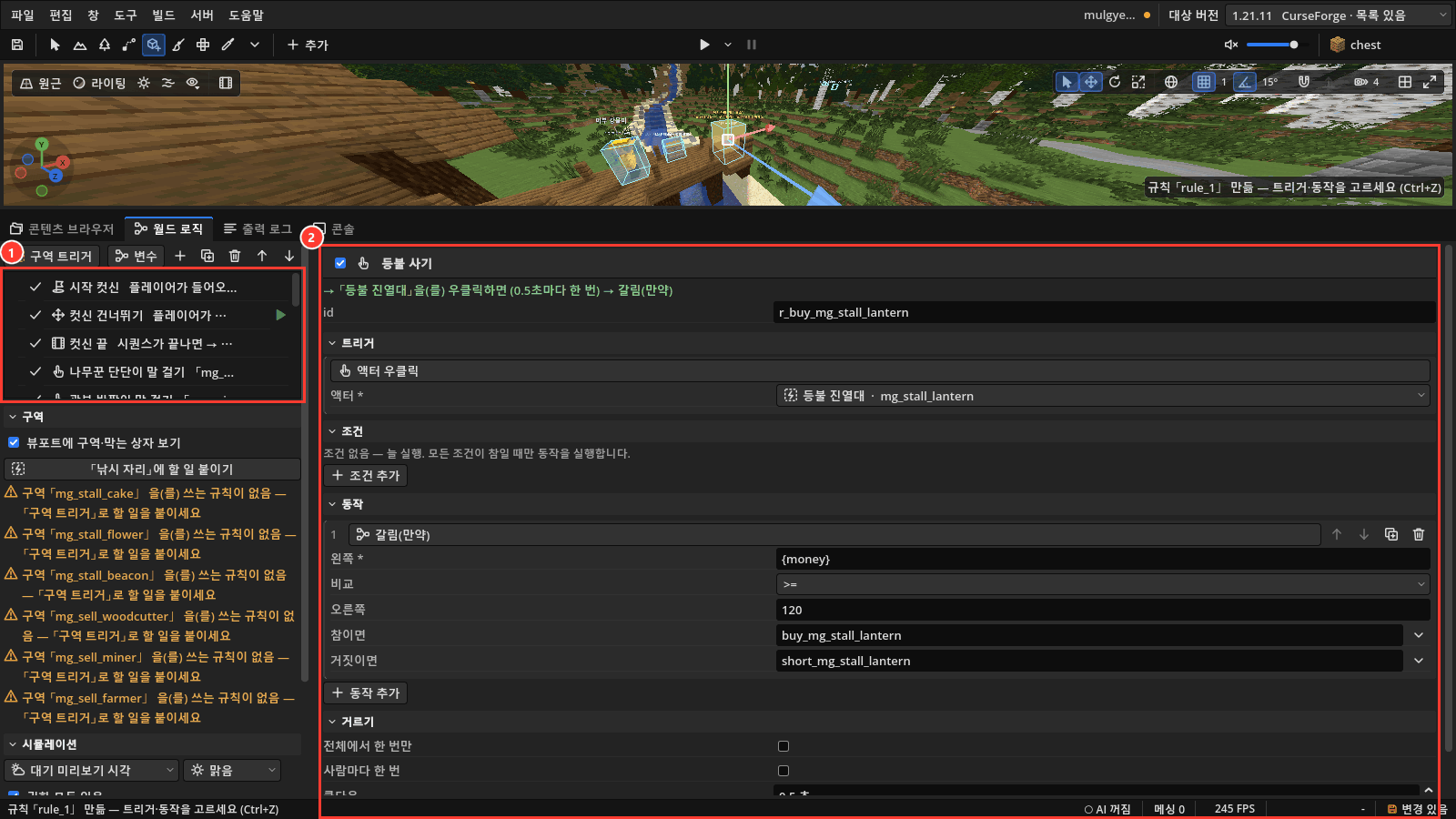
With exactly 120 you buy it (money left 0); with 119 you do not buy it and only the hint appears. Thanks to the 0.5-second cooldown, two quick clicks buy only once.
-
There are also 3 selling rules. The right-click rule first takes all the apples from the bag (putting the count taken into
sold), and if there are any, adds the selling price.id Trigger Actions fn_sold_mg_sell_fisherFunction · function name sold_mg_sell_fisherSet variable ( money·add· Values{sold} * 30) → Chat message (사과 {sold}알을 팔았습니다. 돈 {money}원, “You sold {sold} apples. Money {money}”)fn_nosell_mg_sell_fisherFunction · function name nosell_mg_sell_fisherChat message ( 팔 사과가 없습니다. 1알에 30원에 사요., “You have no apples to sell. I pay 30 each.”)r_sell_mg_sell_fisherRight-click actor · Actor mg_sell_fisher· cooldown0.5Take item (Item minecraft:apple· Count 2304 · Result variable (optional)sold) → Branch (if) (Left{sold}· Compare>· Right0· If truesold_mg_sell_fisher· If falsenosell_mg_sell_fisher)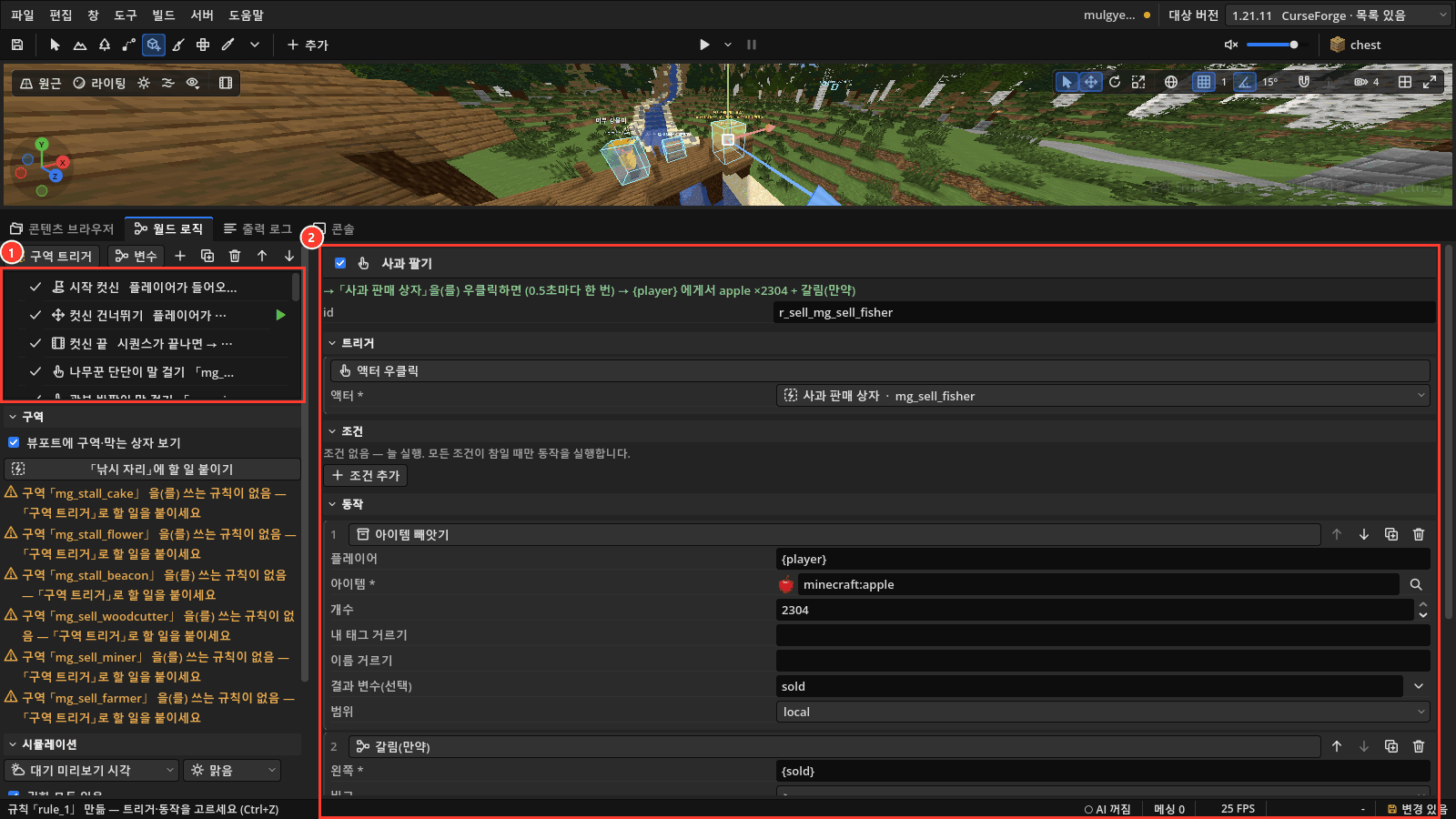
-
The fishing rule. Set
idr_gather_mg_gather_fish(confirm with Enter) and name낚시 자리(Fishing spot). The trigger is Right-click actor (Actormg_gather_fish), the actions are Give item (minecraft:cod· 1) → Chat message (대구를 한 마리 낚았습니다., “You caught a cod.”), and Cooldown5. It gives an item only once every 5 seconds.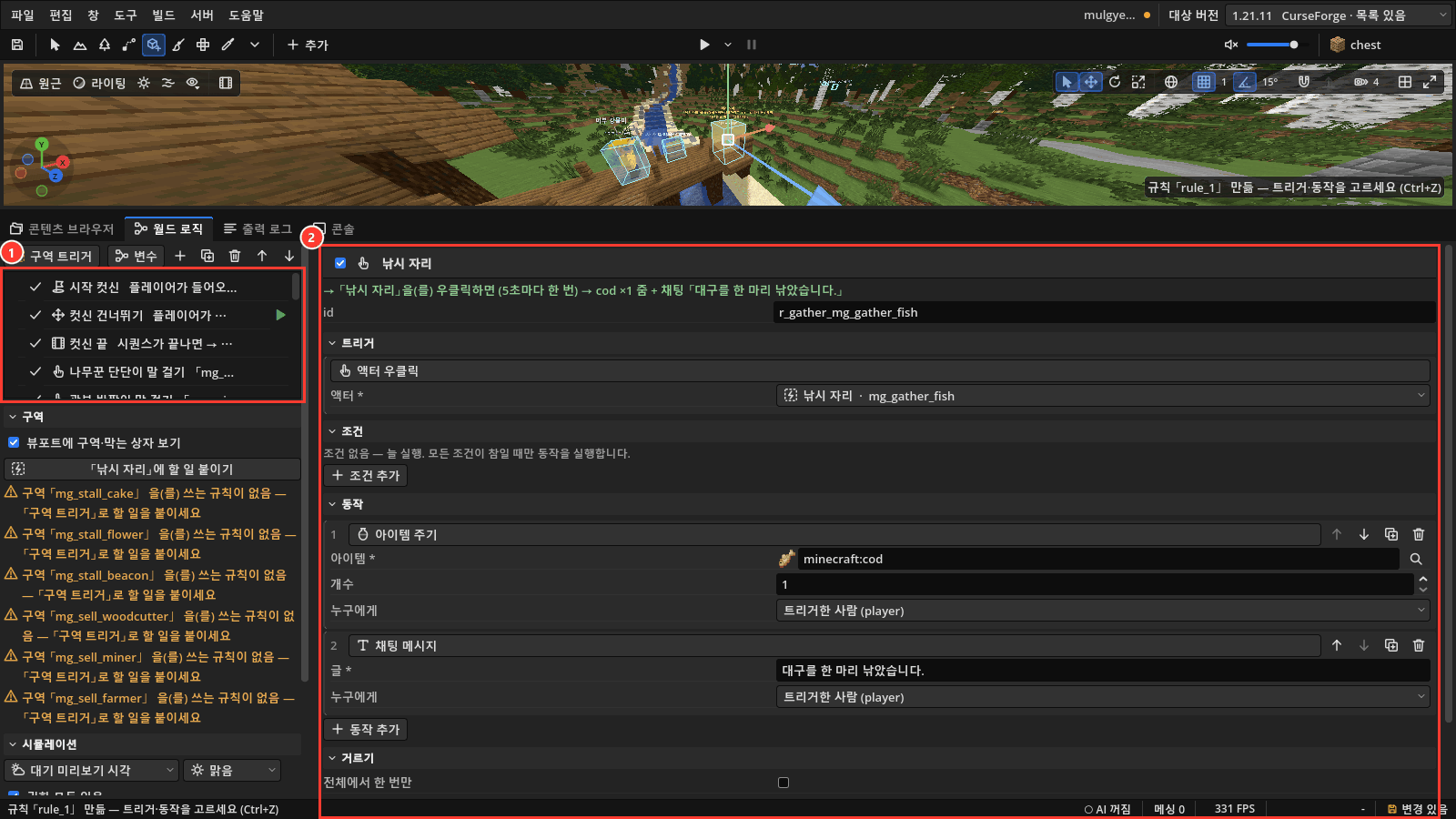
One loop in Play
Section titled “One loop in Play”-
Open the left and right areas again and click the ▶ (Play) button. When the part 2 opening cutscene plays, skip it with Shift. Walk up to the fisher, look at him, and press F. The first line of dialogue appears, and the second line follows 1.5 seconds later. You see the name tag above the fisher’s head and, below, the talk zone box (an editing line shown only in ▶).
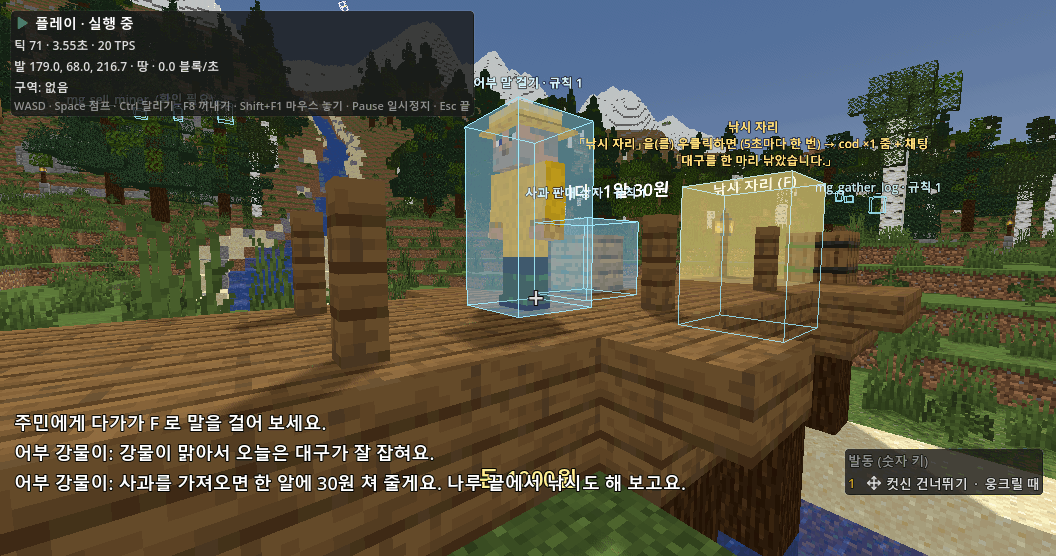
-
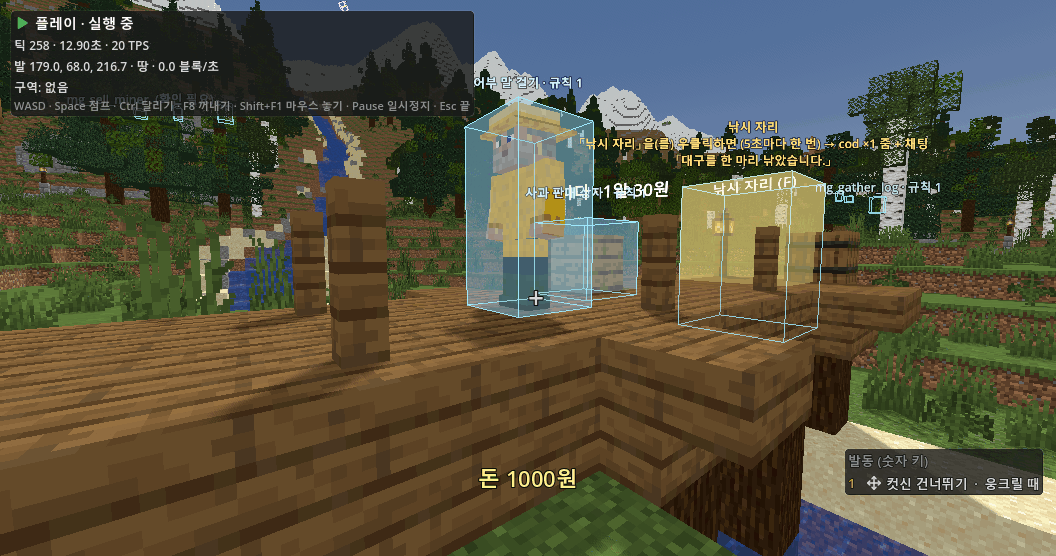
When the cutscene ends, “Money 1000” appears on the action bar (updated every 1.5 seconds). You see it after the chat hint disappears.
-
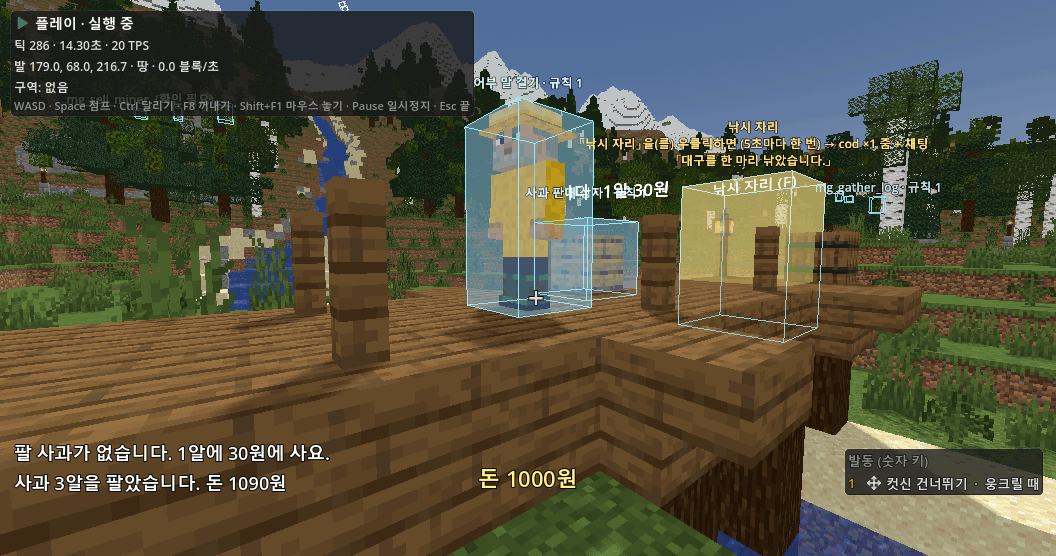
Look at the sales chest and press F. With no apples you get “You have no apples to sell. I pay 30 each.” (in Korean in the sample) and your money stays the same. With apples (you get them at the farmer’s apple tree gathering spot, “Pick apples”) and a click on the same chest, they all sell and your money grows (3 apples = 90, 1000 → 1090).
-
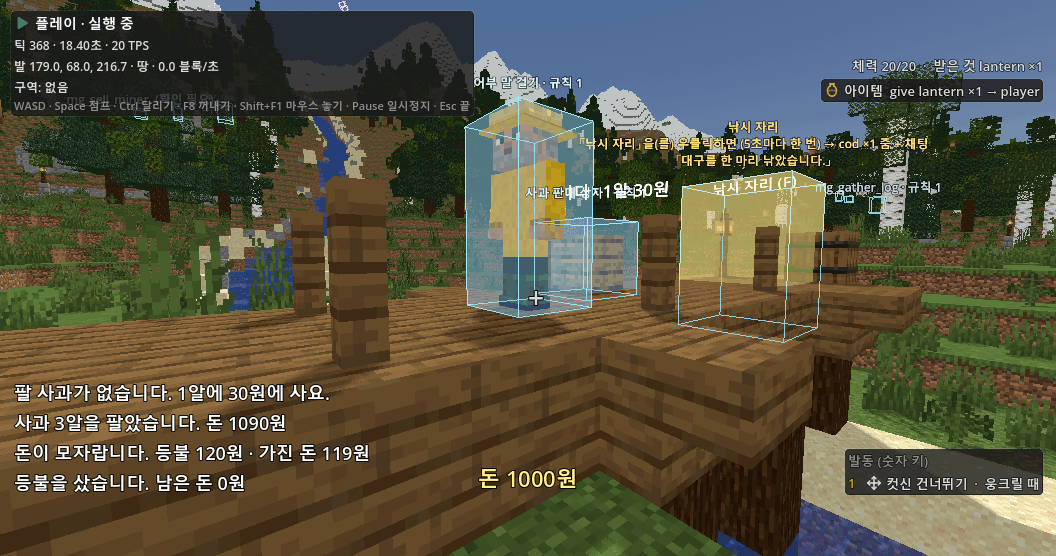
Look at the fisher’s stall (lantern) and press F. With 120 or more, “You bought a lantern. Money left …” appears, your money drops, and the lantern goes into your bag. If you are short, you get “Not enough money. Lantern 120 · you have … ”. The “when short” part of the picture below was taken with the money changed, so it does not appear as is. Starting with 1000, you buy the lantern 8 times, and the hint “you have 40” appears on the 9th click (if you sold apples in step 18, you can buy that many more).
-
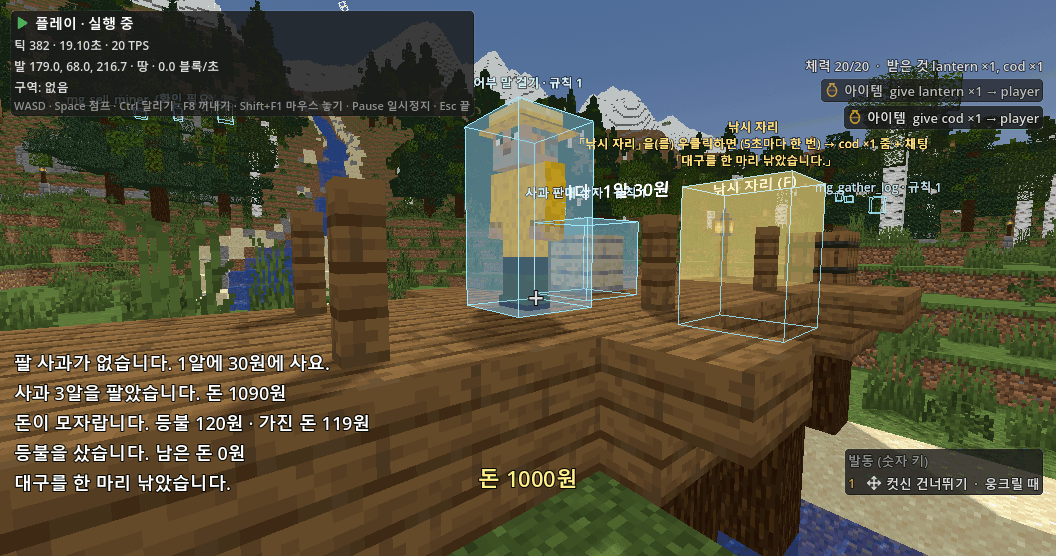
Look at the fishing spot at the end of the pier and press F. “You caught a cod.” appears and a cod goes into your bag. If you click again within 5 seconds, nothing is given. End Play with Esc.
When you get here
Section titled “When you get here”-
The fisher Gangmuli now has a name tag, talking, fishing, buying apples, and selling lanterns, and money starts at 1000 separately for each player. For the other villagers (woodcutter, miner, farmer, shopkeeper), you can make their stall and sales chest rules the same way by changing only the ids and values. Starting file 4 (
mulgyeol_start4.npworld) is the result of this part plus the square and dance preparation, so continue part 4 with your own file or start from starting file 4.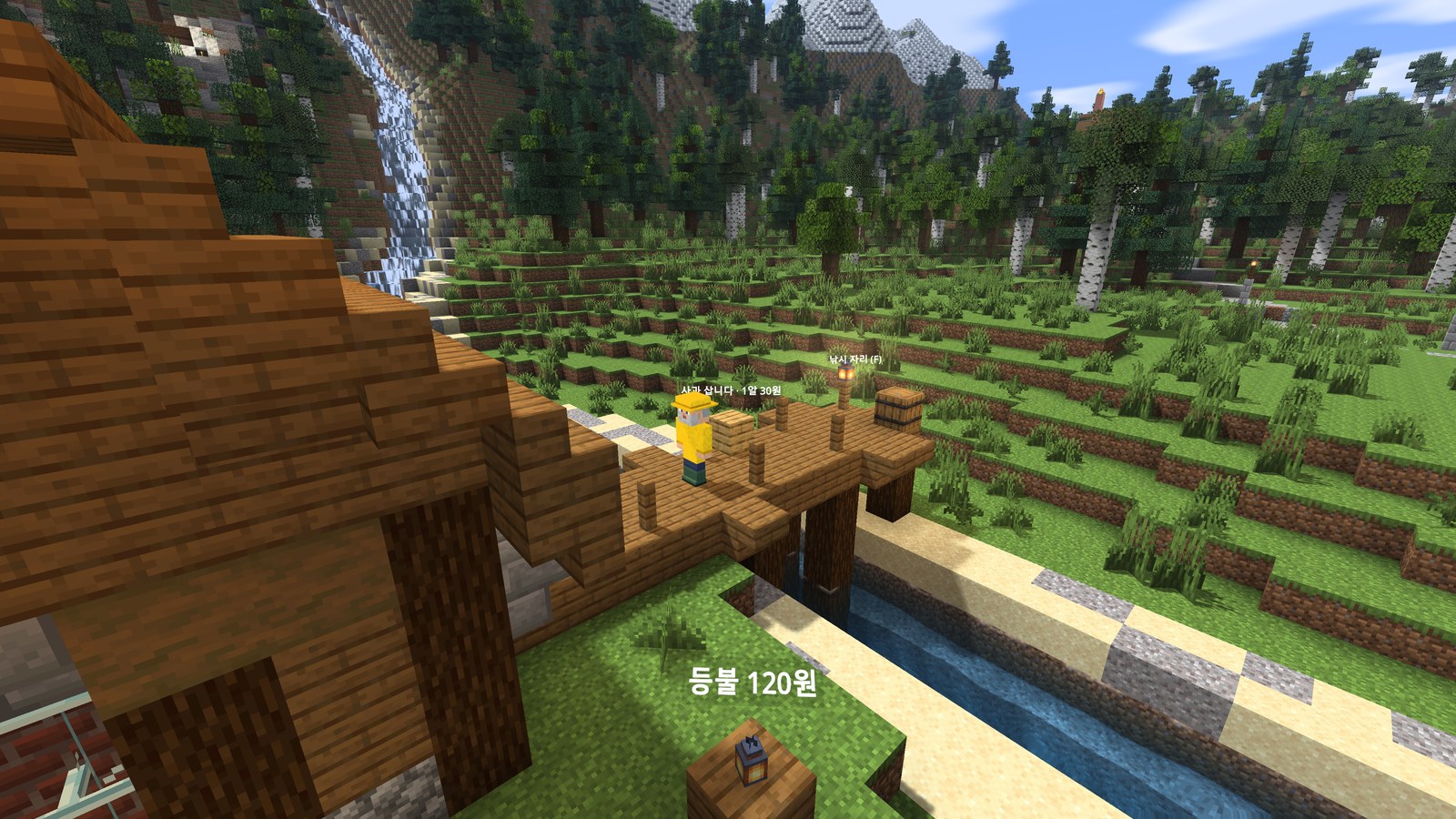
Tips and tricks
Section titled “Tips and tricks”- Use the icon that duplicates a rule (next to the ”+” in the row above the rule list in the World logic tab; hovering shows “Duplicate selected rule”) to make the other stall and sales chest rules quickly. Change only the duplicated rule’s
id, name, Actor, and values. - A rule’s Cooldown stops the same person from mashing. Talking 3 seconds, buying and selling 0.5 seconds, and gathering 5 seconds are the values in this tutorial.
Reference
Section titled “Reference”Rules used
Section titled “Rules used”| id | What it does |
|---|---|
r_talk_mg_fisher | Talking to the fisher (chat · wait · chat) |
fn_show_money · r_money_tick | The money display function · the 1.5-second timer |
fn_buy_… · fn_short_… · r_buy_… | Buying a lantern (when there is money · when short · right-click) |
fn_sold_… · fn_nosell_… · r_sell_… | Selling apples (the price · nothing to sell · right-click) |
r_gather_mg_gather_fish | Fishing |
- On the server (the game), a moving-model villager is sent as a static model if its actor id appears anywhere in the text of a rule or sequence. So use an English id (
mg_fisher) and do not use the id word in dialogue or name tag text. - In ▶ in the editor, trigger boxes such as the talk zone are visible (editing lines), but they are not visible in the real game.
Related pages
Section titled “Related pages”The detailed explanation of each feature is in the pages below.
Not an official Minecraft product. Not approved by or associated with Mojang or Microsoft.